DeepEval 5-min Quickstart
This quickstart takes you from installing DeepEval to your first passing eval in a few
minutes. You'll create a small test case, choose a metric, and run it with
deepeval test run.
By the end of this quickstart, you should be able to:
- Run your first local eval with a test case, metric, and
deepeval test run. - Evaluate an AI agent's complete trajectory and diagnose its internal components with tracing.
- Know where to go next for datasets, integrations, and the Confident AI platform.
New to DeepEval? Checkout the introduction to learn more about this framework.
Installation
In a newly created virtual environment, run:
pip install -U deepevaldeepeval plugs into Pytest, so deepeval test run collects and runs your eval files the same way pytest would.
For CI or other non-interactive environments, pass an existing key with deepeval login --api-key ....
Configure Environment Variables
DeepEval autoloads environment files (at import time)
- Precedence: existing process env ->
.env.local->.env - Opt-out: set
DEEPEVAL_DISABLE_DOTENV=1
More information on env settings can be found here.
# quickstart
cp .env.example .env.local
# then edit .env.local (ignored by git)Create Your First Test Run
Create a test file to run your first end-to-end evaluation.
An LLM test case in deepeval represents a single unit of LLM app interaction, and contains mandatory fields such as the input and actual_output (LLM generated output), and optional ones like expected_output.
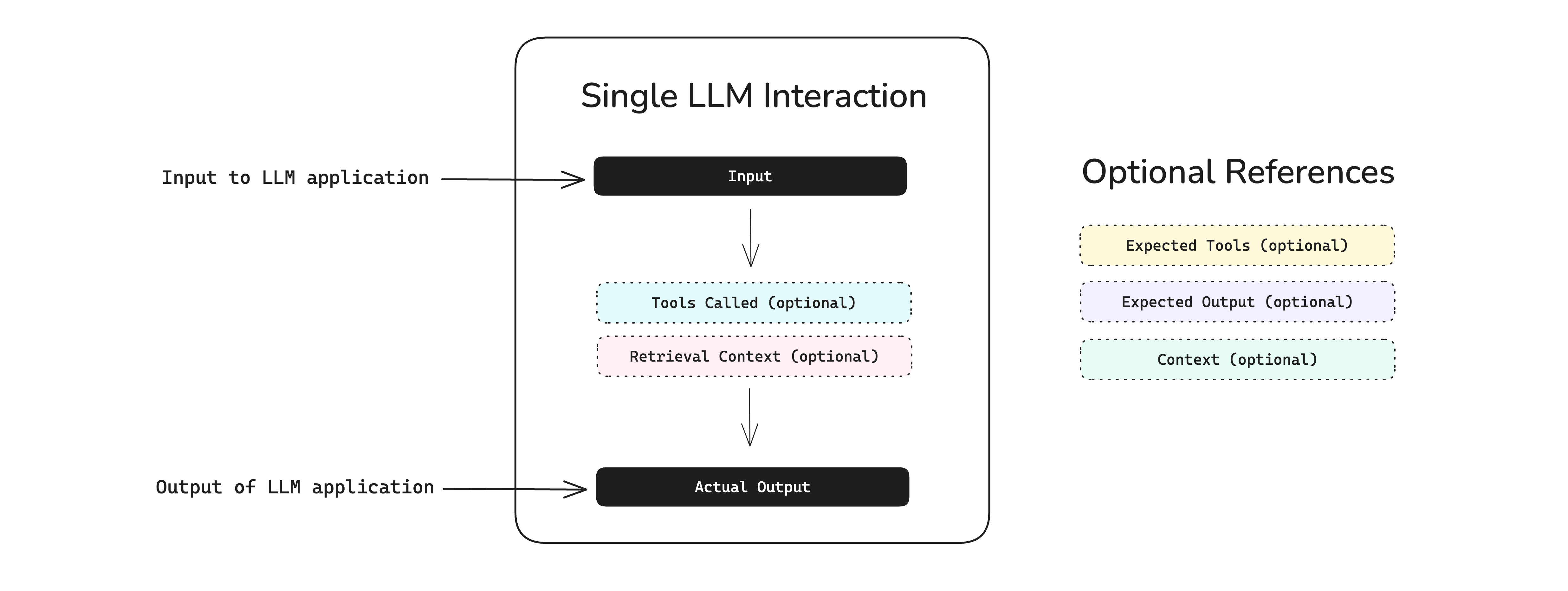
Run touch test_example.py in your terminal and paste in the following code:
Set your OPENAI_API_KEY as an env variable (or configure any other LLM) before running this example.
from deepeval import assert_test
from deepeval.test_case import LLMTestCase, SingleTurnParams
from deepeval.metrics import GEval

def test_correctness():
    correctness_metric = GEval(
        name="Correctness",
        criteria="Determine if the 'actual output' is correct based on the 'expected output'.",
        evaluation_params=[SingleTurnParams.ACTUAL_OUTPUT, SingleTurnParams.EXPECTED_OUTPUT],
        threshold=0.5
    )
    test_case = LLMTestCase(
        input="I have a persistent cough and fever. Should I be worried?",
        # Replace this with the actual output from your LLM application
        actual_output="A persistent cough and fever could be a viral infection or something more serious. See a doctor if symptoms worsen or don't improve in a few days.",
        expected_output="A persistent cough and fever could indicate a range of illnesses, from a mild viral infection to more serious conditions like pneumonia or COVID-19. You should seek medical attention if your symptoms worsen, persist for more than a few days, or are accompanied by difficulty breathing, chest pain, or other concerning signs."
    )
    assert_test(test_case, [correctness_metric])
Set your TYPESAFE_API_KEY as an env variable (configure Jev) before running this example. No LLM key is needed.
from deepeval.metrics.jev_eval import Noul, Score
from deepeval.test_case import LLMTestCase, SingleTurnParams
from deepeval.metrics import JevEval
from deepeval import assert_test

def test_correctness():
    correctness_metric = JevEval(
        name="Correctness",
        evaluation_params=[SingleTurnParams.ACTUAL_OUTPUT, SingleTurnParams.EXPECTED_OUTPUT],
        questions=[
            Noul("No fact in actual_output contradicts a fact in expected_output.", weight=2),
            Score(
                "How much of the detail in expected_output is present in actual_output?",
                levels=["Almost none", "Some", "Most", "All of it"],
            ),
        ],
        threshold=0.5,
    )
    test_case = LLMTestCase(
        input="I have a persistent cough and fever. Should I be worried?",
        # Replace this with the actual output from your LLM application
        actual_output="A persistent cough and fever could be a viral infection or something more serious. See a doctor if symptoms worsen or don't improve in a few days.",
        expected_output="A persistent cough and fever could indicate a range of illnesses, from a mild viral infection to more serious conditions like pneumonia or COVID-19. You should seek medical attention if your symptoms worsen, persist for more than a few days, or are accompanied by difficulty breathing, chest pain, or other concerning signs.",
    )
    assert_test(test_case, [correctness_metric])
Then, run deepeval test run from the root directory of your project to evaluate your LLM app end-to-end:
deepeval test run test_example.pyCongratulations! Your test case should have passed ✅ Let's breakdown what happened.
- The variable
inputmimics a user input, andactual_outputis a placeholder for what your application's supposed to output based on this input. - The variable
expected_outputrepresents the ideal answer for a giveninput, andGEvalis a research-backed metric provided bydeepevalfor you to evaluate your LLM output's on any custom metric with human-like accuracy. - In this example, the metric
criteriais correctness of theactual_outputbased on the providedexpected_output, but not all metrics require anexpected_output. - All metric scores range from 0 - 1, which the
threshold=0.5threshold ultimately determines if your test have passed or not.
If you run more than one test run, you will be able to catch regressions by comparing test cases side-by-side. This is also made easier if you're using deepeval alongside Confident AI (see below for video demo).
A conversational test case in deepeval represents a multi-turn interaction with your LLM app, and contains information such as the actual conversation that took place in the format of turns, and optionally the scenario of which a conversation happened.
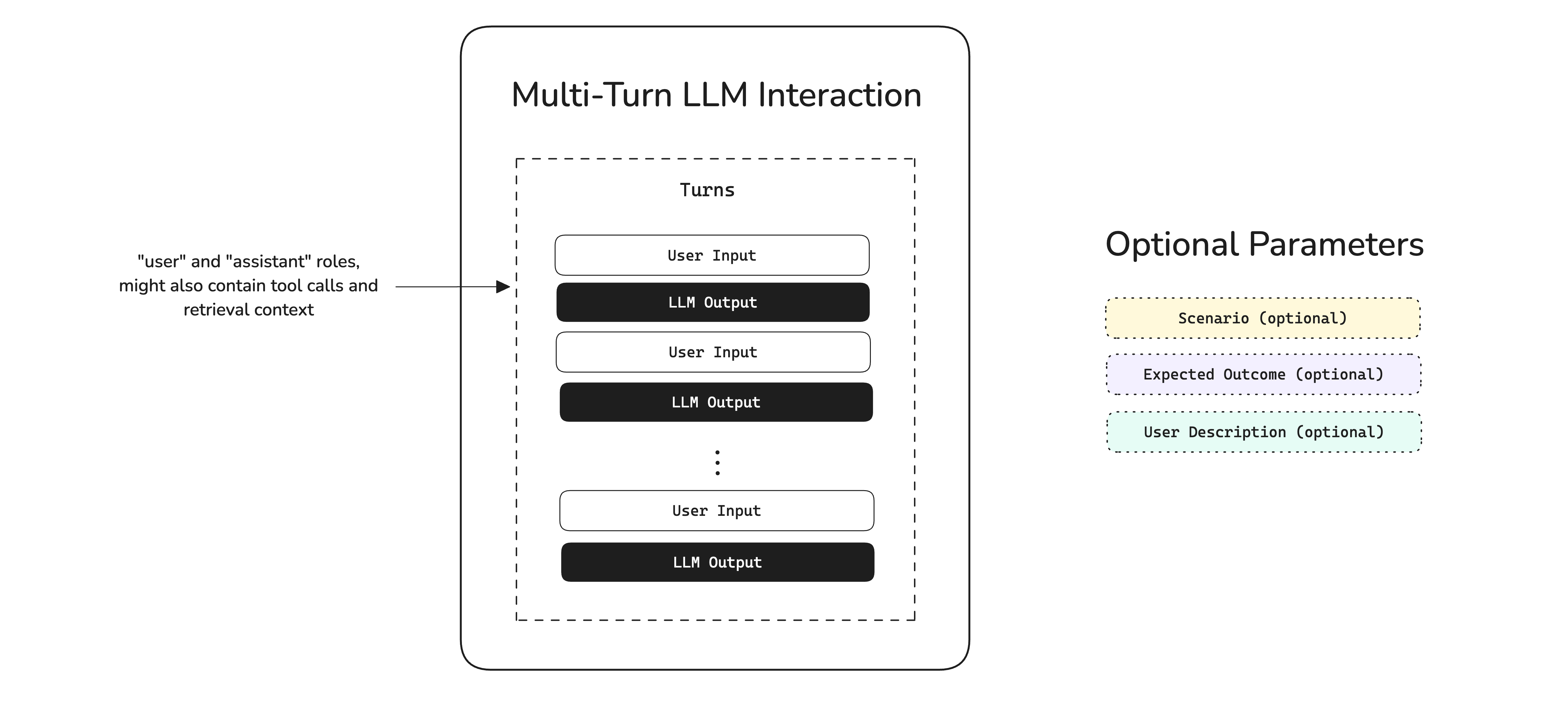
Run touch test_example.py in your terminal and paste in the following code:
Set your OPENAI_API_KEY as an env variable (or configure any other LLM) before running this example.
from deepeval import assert_test
from deepeval.test_case import Turn, ConversationalTestCase
from deepeval.metrics import ConversationalGEval

def test_professionalism():
    professionalism_metric = ConversationalGEval(
        name="Professionalism",
        criteria="Determine whether the assistant has acted professionally based on the content.",
        threshold=0.5
    )
    test_case = ConversationalTestCase(
        turns=[
            Turn(role="user", content="What is DeepEval?"),
            Turn(role="assistant", content="DeepEval is an open-source LLM eval package.")
        ]
    )
    assert_test(test_case, [professionalism_metric])
Set your TYPESAFE_API_KEY as an env variable (configure Jev) before running this example. No LLM key is needed.
from deepeval.test_case import Turn, ConversationalTestCase, MultiTurnParams
from deepeval.metrics.jev_eval import Noul, Score
from deepeval.metrics import ConversationalJevEval
from deepeval import assert_test

def test_professionalism():
    professionalism_metric = ConversationalJevEval(
        name="Professionalism",
        evaluation_params=[MultiTurnParams.CONTENT],
        questions=[
            Noul("Every assistant turn in turns is polite and professional in tone.", weight=2),
            Score(
                "How professional is the assistant across turns?",
                levels=["Unprofessional", "Mostly unprofessional", "Mostly professional", "Fully professional"],
            ),
        ],
        threshold=0.5,
    )
    test_case = ConversationalTestCase(
        turns=[
            Turn(role="user", content="What is DeepEval?"),
            Turn(role="assistant", content="DeepEval is an open-source LLM eval package.")
        ]
    )
    assert_test(test_case, [professionalism_metric])
Then, run deepeval test run from the root directory of your project to evaluate your LLM app end-to-end:
deepeval test run test_example.py🎉 Congratulations! Your test case should have passed ✅ Let's breakdown what happened.
- The variable
roledistinguishes between the end user and your LLM application, andcontentcontains either the user’s input or the LLM’s output. - In this example, the
criteriametric evaluates the professionalism of the sequence ofcontent. - All metric scores range from 0 - 1, which the
threshold=0.5threshold ultimately determines if your test have passed or not.
If you run more than one test run, you will be able to catch regressions by comparing test cases side-by-side. This is also made easier if you're using deepeval alongside Confident AI (see below for video demo).
Save Results
It is recommended that you push your test runs to Confident AI — an AI quality platform deepeval integrates with natively for observability, evals, and monitoring.
Confident AI is an AI observability and evals platform that DeepEval integrates with natively, and helps you build the best LLM evals pipeline.
Run deepeval view to view your newly ran test run on the platform:
deepeval viewThe deepeval view command requires that the test run that you ran above has been successfully cached locally. If something errors, simply run a new test run after logging in with deepeval login:
deepeval loginOnce that's set up, Confident AI will generate testing reports and automate regression testing whenever you run a test run to evaluate your LLM application inside any environment, at any scale, anywhere.
Once you've run more than one test run, you'll be able to use the regression testing page shown near the end of the video. Green rows indicate that your LLM has shown improvement on specific test cases, whereas red rows highlight areas of regression.
Simply set the DEEPEVAL_RESULTS_FOLDER environment variable to your relative path of choice. Everything deepeval stores locally, including the SQLite alternative, is explained here.
# linux
export DEEPEVAL_RESULTS_FOLDER="./data"

# or windows
set DEEPEVAL_RESULTS_FOLDER=.\data
Evaluate an AI Agent
AI agents often take many steps before producing a result. To evaluate whether an agent completed its task and how it got there, first instrument it with LLM tracing, then score its complete trajectory.
Build Dataset
Create a small dataset of representative tasks for your agent:
from deepeval.dataset import EvaluationDataset, Golden

dataset = EvaluationDataset(goldens=[Golden(input="Plan a three-day trip to Paris")])
Instrument and Evaluate Trajectory
Each example instruments the agent, captures one complete trace per golden, and applies TaskCompletionMetric to the full trajectory.
Pick your stack below, paste the snippet, and run it. Every integration ships an Async sample (the default — runs goldens concurrently) and a Sync sample (one golden at a time, useful for debugging or rate-limited providers):
Wrap the top-level function with @observe and call update_current_trace(...) to set the trace-level test case fields:
import asyncio
from deepeval.tracing import observe, update_current_trace
from deepeval.metrics import TaskCompletionMetric
...

@observe()
async def my_ai_agent(query: str) -> str:
    answer = "..."  # await your LLM call here
    update_current_trace(input=query, output=answer)
    return answer

for golden in dataset.evals_iterator(metrics=[TaskCompletionMetric()]):
    task = asyncio.create_task(my_ai_agent(golden.input))
dataset.evaluate(task)from deepeval.evaluate import AsyncConfig
from deepeval.tracing import observe, update_current_trace
from deepeval.metrics import TaskCompletionMetric
...
@observe()
def my_ai_agent(query: str) -> str:
answer = "..." # call your LLM here
update_current_trace(input=query, output=answer)
return answer
for golden in dataset.evals_iterator(
metrics=[TaskCompletionMetric()],
async_config=AsyncConfig(run_async=False),
):
my_ai_agent(golden.input)See tracing for the full @observe and update_current_trace surface.
Build your agent with create_agent, then pass deepeval's CallbackHandler to its invoke / ainvoke method inside the loop:
import asyncio
from langchain.agents import create_agent
from deepeval.integrations.langchain import CallbackHandler
from deepeval.metrics import TaskCompletionMetric
...

def multiply(a: int, b: int) -> int:
    """Multiply two numbers."""
    return a * b

agent = create_agent(
    model="openai:gpt-4o-mini",
    tools=[multiply],
    system_prompt="Be concise.",
)

async def run_agent(prompt: str):
    return await agent.ainvoke(
        {"messages": [{"role": "user", "content": prompt}]},
        config={"callbacks": [CallbackHandler()]},
    )

for golden in dataset.evals_iterator(metrics=[TaskCompletionMetric()]):
    task = asyncio.create_task(run_agent(golden.input))
dataset.evaluate(task)from langchain.agents import create_agent
from deepeval.evaluate import AsyncConfig
from deepeval.integrations.langchain import CallbackHandler
from deepeval.metrics import TaskCompletionMetric
...
def multiply(a: int, b: int) -> int:
"""Multiply two numbers."""
return a * b
agent = create_agent(
model="openai:gpt-4o-mini",
tools=[multiply],
system_prompt="Be concise.",
)
for golden in dataset.evals_iterator(
metrics=[TaskCompletionMetric()],
async_config=AsyncConfig(run_async=False),
):
agent.invoke(
{"messages": [{"role": "user", "content": golden.input}]},
config={"callbacks": [CallbackHandler()]},
)See the LangChain integration for the full surface.
Wire your StateGraph, then pass deepeval's CallbackHandler to its invoke / ainvoke method inside the loop:
import asyncio
from langchain.chat_models import init_chat_model
from langgraph.graph import StateGraph, MessagesState, START, END
from deepeval.integrations.langchain import CallbackHandler
from deepeval.metrics import TaskCompletionMetric
...

llm = init_chat_model("openai:gpt-4o-mini")

async def chatbot(state: MessagesState):
    return {"messages": [await llm.ainvoke(state["messages"])]}

graph = (
    StateGraph(MessagesState)
    .add_node(chatbot)
    .add_edge(START, "chatbot")
    .add_edge("chatbot", END)
    .compile()
)

async def run_graph(prompt: str):
    return await graph.ainvoke(
        {"messages": [{"role": "user", "content": prompt}]},
        config={"callbacks": [CallbackHandler()]},
    )

for golden in dataset.evals_iterator(metrics=[TaskCompletionMetric()]):
    task = asyncio.create_task(run_graph(golden.input))
dataset.evaluate(task)from langchain.chat_models import init_chat_model
from langgraph.graph import StateGraph, MessagesState, START, END
from deepeval.evaluate import AsyncConfig
from deepeval.integrations.langchain import CallbackHandler
from deepeval.metrics import TaskCompletionMetric
...
llm = init_chat_model("openai:gpt-4o-mini")
def chatbot(state: MessagesState):
return {"messages": [llm.invoke(state["messages"])]}
graph = (
StateGraph(MessagesState)
.add_node(chatbot)
.add_edge(START, "chatbot")
.add_edge("chatbot", END)
.compile()
)
for golden in dataset.evals_iterator(
metrics=[TaskCompletionMetric()],
async_config=AsyncConfig(run_async=False),
):
graph.invoke(
{"messages": [{"role": "user", "content": golden.input}]},
config={"callbacks": [CallbackHandler()]},
)See the LangGraph integration for the full surface.
Drop-in replace from openai import OpenAI with from deepeval.openai import OpenAI (or AsyncOpenAI). Wrap the call in with trace(): so the LLM call becomes a trace:
import asyncio
from deepeval.openai import AsyncOpenAI
from deepeval.tracing import trace
from deepeval.metrics import TaskCompletionMetric
...

client = AsyncOpenAI()

async def call_openai(prompt: str):
    with trace():
        return await client.chat.completions.create(
            model="gpt-4o-mini",
            messages=[{"role": "user", "content": prompt}],
        )

for golden in dataset.evals_iterator(metrics=[TaskCompletionMetric()]):
    task = asyncio.create_task(call_openai(golden.input))
dataset.evaluate(task)from deepeval.openai import OpenAI
from deepeval.tracing import trace
from deepeval.evaluate import AsyncConfig
from deepeval.metrics import TaskCompletionMetric
...
client = OpenAI()
for golden in dataset.evals_iterator(
metrics=[TaskCompletionMetric()],
async_config=AsyncConfig(run_async=False),
):
with trace():
client.chat.completions.create(
model="gpt-4o-mini",
messages=[{"role": "user", "content": golden.input}],
)See the OpenAI integration for streaming and tool-calling.
Pass DeepEvalInstrumentationSettings() to your Agent's instrument keyword:
import asyncio
from pydantic_ai import Agent
from deepeval.integrations.pydantic_ai import DeepEvalInstrumentationSettings
from deepeval.metrics import TaskCompletionMetric
...

agent = Agent(
    "openai:gpt-4.1",
    system_prompt="Be concise.",
    instrument=DeepEvalInstrumentationSettings(),
)

for golden in dataset.evals_iterator(metrics=[TaskCompletionMetric()]):
    task = asyncio.create_task(agent.run(golden.input))
dataset.evaluate(task)from pydantic_ai import Agent
from deepeval.evaluate import AsyncConfig
from deepeval.integrations.pydantic_ai import DeepEvalInstrumentationSettings
from deepeval.metrics import TaskCompletionMetric
...
agent = Agent(
"openai:gpt-4.1",
system_prompt="Be concise.",
instrument=DeepEvalInstrumentationSettings(),
)
for golden in dataset.evals_iterator(
metrics=[TaskCompletionMetric()],
async_config=AsyncConfig(run_async=False),
):
agent.run_sync(golden.input)See the Pydantic AI integration for the full surface.
Call instrument_agentcore() before creating your agent. The same call also instruments Strands agents running inside AgentCore:
import asyncio
from strands import Agent
from deepeval.integrations.agentcore import instrument_agentcore
from deepeval.metrics import TaskCompletionMetric
...

instrument_agentcore()

agent = Agent(model="amazon.nova-lite-v1:0")

for golden in dataset.evals_iterator(metrics=[TaskCompletionMetric()]):
    task = asyncio.create_task(agent.invoke_async(golden.input))
dataset.evaluate(task)from strands import Agent
from deepeval.evaluate import AsyncConfig
from deepeval.integrations.agentcore import instrument_agentcore
from deepeval.metrics import TaskCompletionMetric
...
instrument_agentcore()
agent = Agent(model="amazon.nova-lite-v1:0")
for golden in dataset.evals_iterator(
metrics=[TaskCompletionMetric()],
async_config=AsyncConfig(run_async=False),
):
agent(golden.input)See the AgentCore integration for the full surface (including the BedrockAgentCoreApp entrypoint pattern).
Call instrument_strands() before invoking your Strands agent (for AgentCore-hosted Strands, use the AgentCore tab instead):
import asyncio
from strands import Agent
from strands.models.openai import OpenAIModel
from deepeval.integrations.strands import instrument_strands
from deepeval.metrics import TaskCompletionMetric
...

instrument_strands()

agent = Agent(
    model=OpenAIModel(model_id="gpt-4o-mini"),
    system_prompt="You are a helpful assistant.",
)

for golden in dataset.evals_iterator(metrics=[TaskCompletionMetric()]):
    task = asyncio.create_task(agent.invoke_async(golden.input))
dataset.evaluate(task)from strands import Agent
from strands.models.openai import OpenAIModel
from deepeval.evaluate import AsyncConfig
from deepeval.integrations.strands import instrument_strands
from deepeval.metrics import TaskCompletionMetric
...
instrument_strands()
agent = Agent(
model=OpenAIModel(model_id="gpt-4o-mini"),
system_prompt="You are a helpful assistant.",
)
for golden in dataset.evals_iterator(
metrics=[TaskCompletionMetric()],
async_config=AsyncConfig(run_async=False),
):
agent(golden.input)See the Strands integration for the full surface.
Drop-in replace from anthropic import Anthropic with from deepeval.anthropic import Anthropic (or AsyncAnthropic). Wrap the call in with trace(): so the LLM call becomes a trace:
import asyncio
from deepeval.anthropic import AsyncAnthropic
from deepeval.tracing import trace
from deepeval.metrics import TaskCompletionMetric
...

client = AsyncAnthropic()

async def call_claude(prompt: str):
    with trace():
        return await client.messages.create(
            model="claude-sonnet-4-5",
            max_tokens=1024,
            messages=[{"role": "user", "content": prompt}],
        )

for golden in dataset.evals_iterator(metrics=[TaskCompletionMetric()]):
    task = asyncio.create_task(call_claude(golden.input))
dataset.evaluate(task)from deepeval.anthropic import Anthropic
from deepeval.tracing import trace
from deepeval.evaluate import AsyncConfig
from deepeval.metrics import TaskCompletionMetric
...
client = Anthropic()
for golden in dataset.evals_iterator(
metrics=[TaskCompletionMetric()],
async_config=AsyncConfig(run_async=False),
):
with trace():
client.messages.create(
model="claude-sonnet-4-5",
max_tokens=1024,
messages=[{"role": "user", "content": golden.input}],
)See the Anthropic integration for streaming and tool-use.
Register deepeval's event handler against LlamaIndex's instrumentation dispatcher. agent.run(...) is async-only, so the sync variant uses asyncio.run(...):
import asyncio
from llama_index.llms.openai import OpenAI
from llama_index.core.agent import FunctionAgent
import llama_index.core.instrumentation as instrument
from deepeval.integrations.llama_index import instrument_llama_index
from deepeval.metrics import TaskCompletionMetric
...

instrument_llama_index(instrument.get_dispatcher())

def multiply(a: float, b: float) -> float:
    return a * b

agent = FunctionAgent(
    tools=[multiply],
    llm=OpenAI(model="gpt-4o-mini"),
    system_prompt="You are a helpful calculator.",
)

for golden in dataset.evals_iterator(metrics=[TaskCompletionMetric()]):
    task = asyncio.create_task(agent.run(golden.input))
dataset.evaluate(task)import asyncio
from llama_index.llms.openai import OpenAI
from llama_index.core.agent import FunctionAgent
import llama_index.core.instrumentation as instrument
from deepeval.evaluate import AsyncConfig
from deepeval.integrations.llama_index import instrument_llama_index
from deepeval.metrics import TaskCompletionMetric
...
instrument_llama_index(instrument.get_dispatcher())
def multiply(a: float, b: float) -> float:
return a * b
agent = FunctionAgent(
tools=[multiply],
llm=OpenAI(model="gpt-4o-mini"),
system_prompt="You are a helpful calculator.",
)
for golden in dataset.evals_iterator(
metrics=[TaskCompletionMetric()],
async_config=AsyncConfig(run_async=False),
):
asyncio.run(agent.run(golden.input))See the LlamaIndex integration for the full surface.
Register DeepEvalTracingProcessor once, then build your agent with deepeval's Agent and function_tool shims:
import asyncio
from agents import Runner, add_trace_processor
from deepeval.openai_agents import Agent, DeepEvalTracingProcessor, function_tool
from deepeval.metrics import TaskCompletionMetric
...

add_trace_processor(DeepEvalTracingProcessor())

@function_tool
def get_weather(city: str) -> str:
    return f"It's always sunny in {city}!"

agent = Agent(
    name="weather_agent",
    instructions="Answer weather questions concisely.",
    tools=[get_weather],
)

for golden in dataset.evals_iterator(metrics=[TaskCompletionMetric()]):
    task = asyncio.create_task(Runner.run(agent, golden.input))
dataset.evaluate(task)from agents import Runner, add_trace_processor
from deepeval.evaluate import AsyncConfig
from deepeval.openai_agents import Agent, DeepEvalTracingProcessor, function_tool
from deepeval.metrics import TaskCompletionMetric
...
add_trace_processor(DeepEvalTracingProcessor())
@function_tool
def get_weather(city: str) -> str:
return f"It's always sunny in {city}!"
agent = Agent(
name="weather_agent",
instructions="Answer weather questions concisely.",
tools=[get_weather],
)
for golden in dataset.evals_iterator(
metrics=[TaskCompletionMetric()],
async_config=AsyncConfig(run_async=False),
):
Runner.run_sync(agent, golden.input)See the OpenAI Agents integration for the full surface.
Call instrument_google_adk() once before building your LlmAgent. ADK's runner.run_async(...) is async-only, so the sync variant uses asyncio.run(...):
import asyncio
from google.adk.agents import LlmAgent
from google.adk.runners import InMemoryRunner
from google.genai import types
from deepeval.integrations.google_adk import instrument_google_adk
from deepeval.metrics import TaskCompletionMetric
...

instrument_google_adk()

agent = LlmAgent(model="gemini-2.0-flash", name="assistant", instruction="Be concise.")
runner = InMemoryRunner(agent=agent, app_name="deepeval-quickstart")

async def run_agent(prompt: str) -> str:
    session = await runner.session_service.create_session(
        app_name="deepeval-quickstart", user_id="demo-user",
    )
    message = types.Content(role="user", parts=[types.Part(text=prompt)])
    async for event in runner.run_async(
        user_id="demo-user", session_id=session.id, new_message=message,
    ):
        if event.is_final_response() and event.content:
            return "".join(part.text for part in event.content.parts if getattr(part, "text", None))
    return ""

for golden in dataset.evals_iterator(metrics=[TaskCompletionMetric()]):
    task = asyncio.create_task(run_agent(golden.input))
dataset.evaluate(task)import asyncio
from google.adk.agents import LlmAgent
from google.adk.runners import InMemoryRunner
from google.genai import types
from deepeval.evaluate import AsyncConfig
from deepeval.integrations.google_adk import instrument_google_adk
from deepeval.metrics import TaskCompletionMetric
...
instrument_google_adk()
agent = LlmAgent(model="gemini-2.0-flash", name="assistant", instruction="Be concise.")
runner = InMemoryRunner(agent=agent, app_name="deepeval-quickstart")
async def run_agent(prompt: str) -> str:
session = await runner.session_service.create_session(
app_name="deepeval-quickstart", user_id="demo-user",
)
message = types.Content(role="user", parts=[types.Part(text=prompt)])
async for event in runner.run_async(
user_id="demo-user", session_id=session.id, new_message=message,
):
if event.is_final_response() and event.content:
return "".join(part.text for part in event.content.parts if getattr(part, "text", None))
return ""
for golden in dataset.evals_iterator(
metrics=[TaskCompletionMetric()],
async_config=AsyncConfig(run_async=False),
):
asyncio.run(run_agent(golden.input))See the Google ADK integration for the full surface.
Call instrument_crewai() once, then build your crew with deepeval's Crew, Agent, and @tool shims:
import asyncio
from crewai import Task
from deepeval.integrations.crewai import instrument_crewai, Crew, Agent
from deepeval.metrics import TaskCompletionMetric
...

instrument_crewai()

tutor = Agent(
    role="Math Tutor",
    goal="Answer math questions accurately and concisely.",
    backstory="An experienced tutor who explains simple math clearly.",
)
answer_task = Task(
    description="{question}",
    expected_output="An accurate, concise answer.",
    agent=tutor,
)
crew = Crew(agents=[tutor], tasks=[answer_task])

for golden in dataset.evals_iterator(metrics=[TaskCompletionMetric()]):
    task = asyncio.create_task(crew.kickoff_async({"question": golden.input}))
dataset.evaluate(task)from crewai import Task
from deepeval.evaluate import AsyncConfig
from deepeval.integrations.crewai import instrument_crewai, Crew, Agent
from deepeval.metrics import TaskCompletionMetric
...
instrument_crewai()
tutor = Agent(
role="Math Tutor",
goal="Answer math questions accurately and concisely.",
backstory="An experienced tutor who explains simple math clearly.",
)
task = Task(
description="{question}",
expected_output="An accurate, concise answer.",
agent=tutor,
)
crew = Crew(agents=[tutor], tasks=[task])
for golden in dataset.evals_iterator(
metrics=[TaskCompletionMetric()],
async_config=AsyncConfig(run_async=False),
):
crew.kickoff({"question": golden.input})See the CrewAI integration for the full surface.
Then run the file:
python main.py🎉 Congratulations! Your eval should have run ✅ A quick recap of what happened:
evals_iterator()looped through your dataset, capturing one trace per golden.- Your integration's adapter (or
@observe) created spans recorded the agent's internal steps. TaskCompletionMetricanalyzed the complete ordered trace after the agent finished.- DeepEval aggregated everything into one test run.
Evaluate Individual Components
Trajectory-based evaluation tells you whether the complete path was effective. Component-level evaluation uses the same trace to score one span at a time, helping you identify which planner, retriever, tool call, LLM generation, or sub-agent caused a failure.
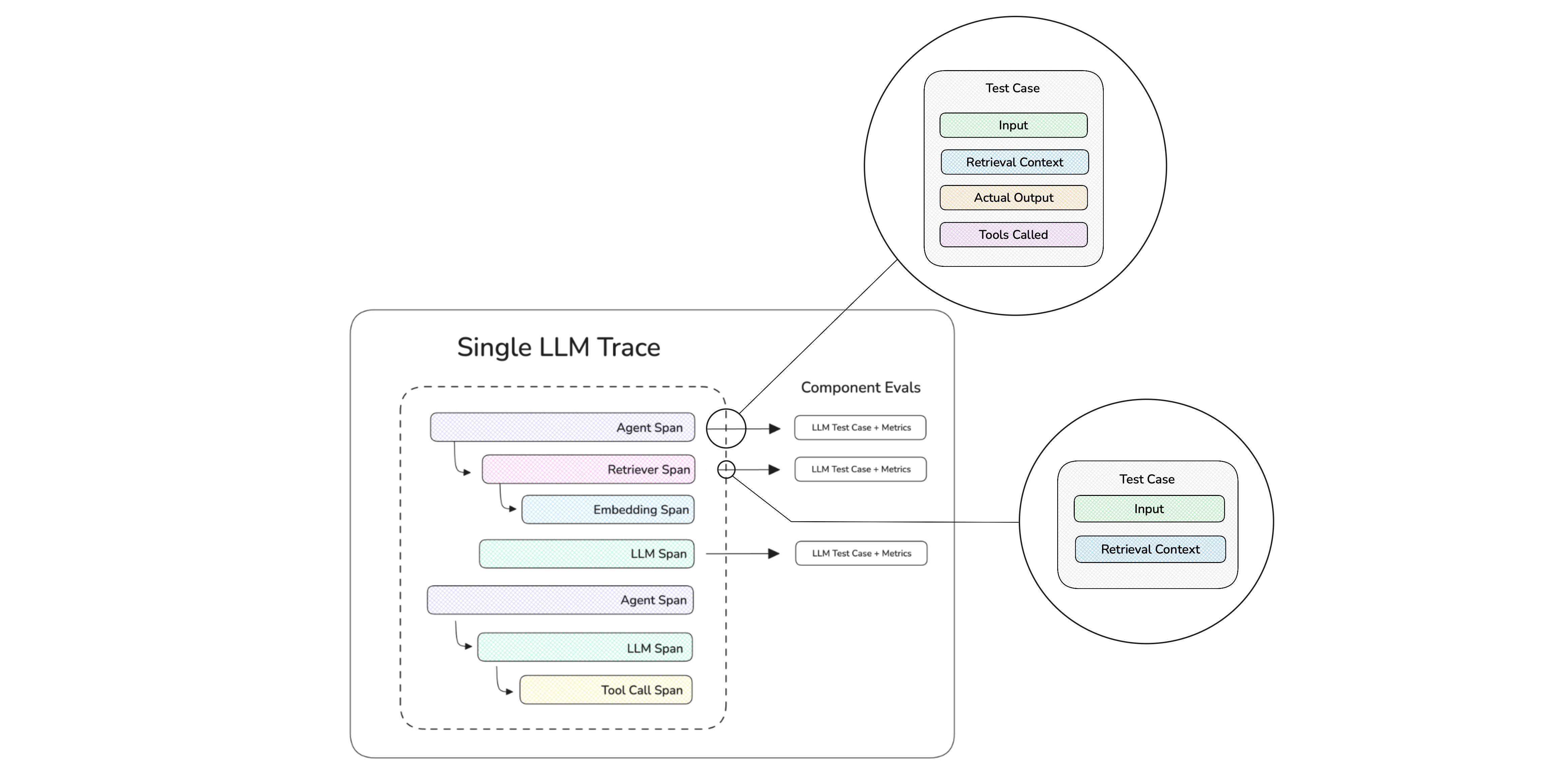
Once your agent is traced, attach component metrics only to the spans you need to diagnose. Trajectory and component scores can run together in the same test run. See the component-level guide for stack-specific examples, sub-agent evaluation, retriever scoring, and span customization.
To run the trajectory eval inside your test suite, invoke the traced agent from the assertion and pass the trajectory metric. Any component metrics attached to its spans run during the same test:
from deepeval.metrics import TaskCompletionMetric
from deepeval.dataset import Golden
from deepeval import assert_test
from agent import my_agent
import pytest

goldens = [Golden(input="Plan a three-day trip to Paris")]

@pytest.mark.parametrize("golden", goldens)
def test_agent(golden: Golden):
    my_agent(golden.input)
    assert_test(golden=golden, metrics=[TaskCompletionMetric()])
Either way, run it with deepeval test run like any other test file.
DeepEval for Online Evals
When you do LLM tracing using deepeval, you can automatically run online evals to monitor traces, spans, and threads (conversations) in production.
You'll need to use Confident AI to provide the necessary backend infrastructure and dashboard for this.
Simply get an API key from Confident AI and set it in the CLI:
CONFIDENT_API_KEY="confident_us..."Then add a "metric collection" to your trace:
from deepeval.tracing import observe, update_current_trace

@observe()
def ai_agent(input: str) -> str:
    output = "Your AI agent output"
    update_current_trace(metric_collection="My Online Evals",)
    return output
✅ Done. All invocations of your AI agent will now have online evals ran on it.
deepeval's LLM tracing implementation is non-instrusive, meaning it will not affect any part of your code.
Trace-level evals can score the observable result with end-to-end evaluation or analyze an agent's complete internal path with trajectory-based evaluation.
Spans make up a trace and evals on spans represents component-level evaluations, where individual components in your LLM app are being evaluated.
Threads are made up of one or more traces, and represents a multi-turn interaction to be evaluated.
Framework Integrations
Already building with an agent framework? DeepEval integrations capture its traces and spans so the same metrics can evaluate complete trajectories and individual components with minimal instrumentation.
Here are a few examples available for your selected SDK:

LangChain
Evaluate complete agent runs, model calls, tools, and retrievers.

Pydantic AI
Evaluate Pydantic AI agents and their instrumented spans.

AWS AgentCore
Evaluate AgentCore-hosted agents and their nested spans.

Google ADK
Evaluate ADK agent runs, tools, and model calls.
Browse all framework integrations →
Next Steps
-
Learn the core concepts if you want to build a repeatable eval suite:
-
Follow a use-case quickstart if you want a path tailored to your system:
-
Explore other workflows when you're ready to go beyond a single eval:
- Generate synthetic data
- Simulate conversations
- Use integrations with LangChain, LangGraph, OpenAI, CrewAI, and more
If your team needs shared reports, regression analysis, or production monitoring, DeepEval integrates natively with Confident AI.
FAQs
Why did my eval get stuck?
Do I need Confident AI for this quickstart?
Where should I put this test file?
tests/ folder. Then run deepeval test run path/to/test_file.py.Can I use a model other than OpenAI?
What should I read after this?
Full Example
You can find the full example here on our Github.