CLI Settings
Quick Summary
deepeval provides a CLI for managing common tasks directly from the terminal. You can use it for:
- Logging in/out and viewing test runs
- Running evaluations from test files
- Checking a project against its governance policy (
deepeval gate) - Diagnosing your environment (
deepeval diagnose): default models, effective settings, and where each value comes from - Enabling/disabling debug
- Opting into experimental features (
deepeval set-mode experimental) - Choosing who decides in LLM-as-a-judge metrics: the LLM, or a System One model (
deepeval set-eval-mode) - Selecting an LLM provider (OpenAI, Azure OpenAI, Gemini, Grok, DeepSeek, OpenRouter, local/Ollama)
- Setting/unsetting provider-specific options (model, endpoint, deployment, etc.)
- Listing and updating any deepeval setting (
deepeval settings -l,deepeval settings --set KEY=VALUE) - Saving settings and secrets persistently to
.envfiles - Inspecting saved test runs in a terminal TUI (
deepeval inspect)
- Generating synthetic goldens from docs, contexts, scratch, or existing goldens
- Selecting an embeddings provider (Azure OpenAI, local, Ollama)
Install & Update
pip install -U deepevalTo review available commands consult the CLI built in help:
deepeval --helpRead & Write Settings
deepeval reads settings from dotenv files in the current working directory, without overriding existing process environment variables. Dotenv precedence (lowest → highest) is: .env → .env.<APP_ENV> → .env.local.
deepeval also uses a legacy JSON keystore at .deepeval/.deepeval for non-secret keys. This keystore is treated as a fallback (dotenv/process env take precedence). Secrets are never written to the JSON keystore.
Core Commands
generate
Use deepeval generate to generate synthetic goldens from the terminal with the Golden Synthesizer. The command requires two selectors:
--method: where goldens come from:docs,contexts,scratch, orgoldens--variation: what to generate:single-turnormulti-turn
Generate single-turn goldens from documents:
deepeval generate \
  --method docs \
  --variation single-turn \
  --documents example.txt \
  --documents another.pdf \
  --output-dir ./synthetic_data
Generate multi-turn goldens from scratch:
deepeval generate \
  --method scratch \
  --variation multi-turn \
  --num-goldens 25 \
  --scenario-context "Users asking support questions" \
  --conversational-task "Help users solve product issues" \
  --participant-roles "User and assistant"
Common options:
| Option | Description |
|---|---|
--method docs|contexts|scratch|goldens | Select the generation method. |
--variation single-turn|multi-turn | Select whether to generate Goldens or ConversationalGoldens. |
--output-dir | Directory where generated goldens are saved. Defaults to ./synthetic_data. |
--file-type json|csv|jsonl | Output file type. Defaults to json. |
--file-name | Optional output filename without extension. |
--model | Model to use for generation. |
--async-mode / --sync-mode | Enable or disable concurrent generation. |
--max-concurrent | Maximum number of concurrent generation tasks. |
--include-expected / --no-include-expected | Generate or skip expected outputs/outcomes. |
--cost-tracking | Print generation cost when supported by the model. |
Method-specific options:
| Method | Required Options | Useful Optional Options |
|---|---|---|
docs | --documents | --max-goldens-per-context, --max-contexts-per-document, --min-contexts-per-document, --chunk-size, --chunk-overlap, --context-quality-threshold, --context-similarity-threshold, --max-retries |
contexts | --contexts-file | --max-goldens-per-context |
scratch | --num-goldens plus styling options | Single-turn: --scenario, --task, --input-format, --expected-output-format. Multi-turn: --scenario-context, --conversational-task, --participant-roles, --scenario-format, --expected-outcome-format |
goldens | --goldens-file | --max-goldens-per-golden |
For a deeper walkthrough, see the Golden Synthesizer docs.
test
Use deepeval test run to run evaluation test files through pytest with the deepeval pytest plugin enabled.
deepeval test --help
deepeval test run --help
Run a single test file:
deepeval test run test_chatbot.pyRun a test directory:
deepeval test run tests/evalsRun a specific test:
deepeval test run test_chatbot.py::test_answer_relevancyUseful options:
| Option | Description |
|---|---|
--verbose, -v | Show verbose pytest output and turn on deepeval verbose mode. |
--exit-on-first-failure, -x | Stop after the first failed test. |
--show-warnings, -w | Show pytest warnings instead of disabling them. |
--identifier, -id | Attach an identifier to the test run. |
--num-processes, -n | Run tests with multiple pytest-xdist processes. |
--repeat, -r | Rerun each test case the specified number of times. |
--use-cache, -c | Use cached evaluation results when --repeat is not set. |
--ignore-errors, -i | Continue when deepeval evaluation errors occur. |
--skip-on-missing-params, -s | Skip test cases with missing metric parameters. |
--display, -d | Control final result display. Defaults to showing all results. |
--mark, -m | Run tests matching a pytest marker expression. |
--official, -o | Mark this test run as the official baseline on Confident AI. |
You can pass additional pytest flags after the deepeval options. For example:
deepeval test run tests/evals \
  --mark "not slow" \
  --exit-on-first-failure \
  -- --tb=short
inspect
Use deepeval inspect to open a saved test run inside a terminal TUI — a trace-tree viewer for metric scores, reasons, inputs/outputs, tool calls, and retriever context, all without leaving the terminal.
The TUI is a trace viewer, so it's only useful for runs whose test cases captured a trace from an instrumented app. Every such run writes a rolling snapshot into the gitignored .deepeval cache dir, so the zero-arg form picks up the most recent one automatically:
Traces come from evals_iterator() against an agent instrumented with @observe (see single-turn end-to-end evals). Each call rewrites .deepeval/.latest_run_full.json.
deepeval inspectYou can also point it at a specific file or folder:
deepeval inspect ./experiments/test_run_20260512_174200.json
deepeval inspect ./experiments          # latest test_run_*.json inside
deepeval inspect --folder ./experiments # same, via explicit flag
This allows you to inspect traces and spans locally on your machine:
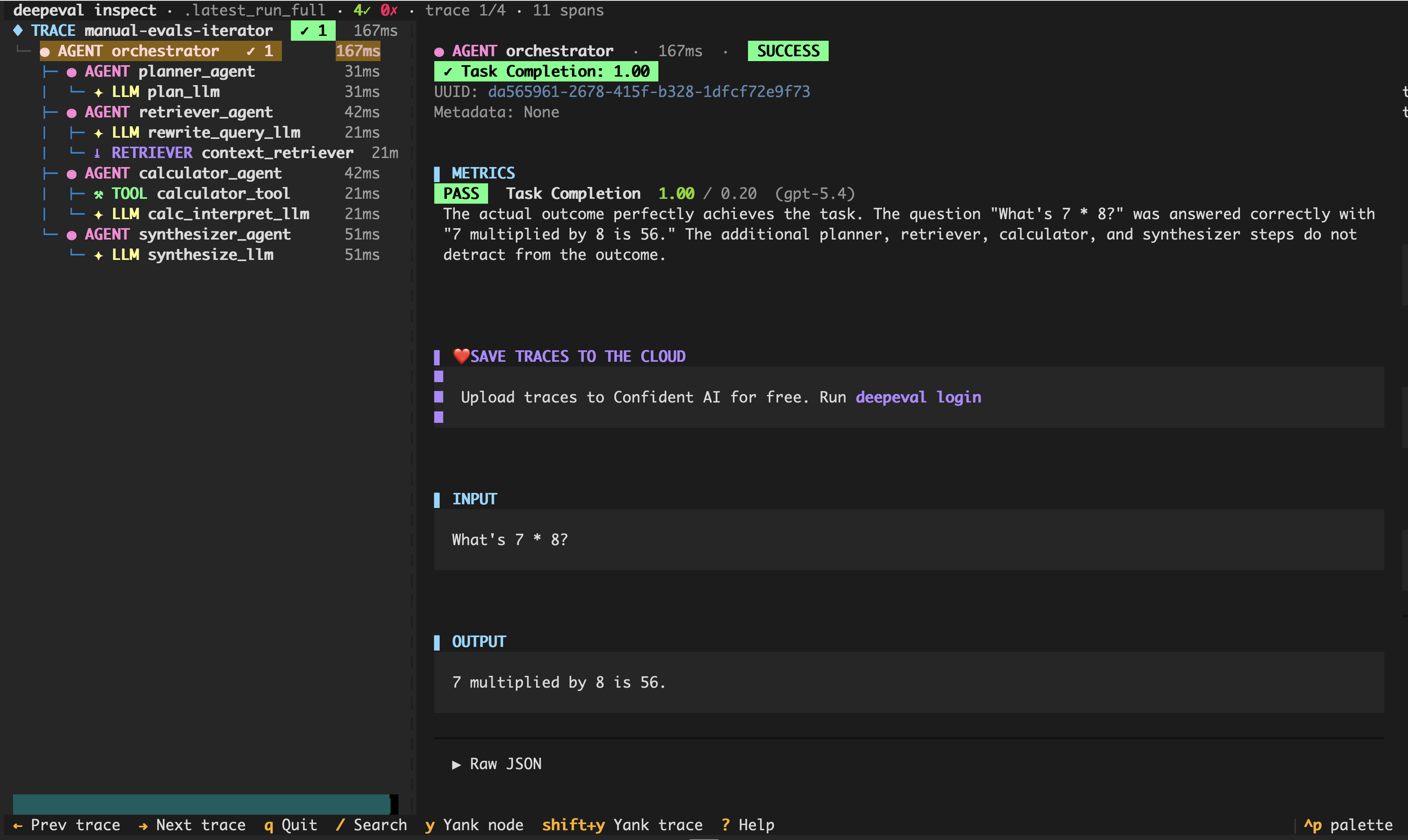
Move with ↑/↓ or j/k, fold a span with h/l, and cycle between traces with ←/→ or n/p. Press / to filter spans by name, y to copy the selected node as JSON (Y for the whole trace), ? for the keybinding list, and q to quit.
Resolution order when no path is passed: --folder → DEEPEVAL_RESULTS_FOLDER → .deepeval/deepeval.db (when DEEPEVAL_LOCAL_STORE=sqlite) → .deepeval/.latest_run_full.json → ./experiments (legacy fallback).
The TUI needs an optional extras bundle (Textual + clipboard support):
pip install 'deepeval[inspect]'When runs are saved with DEEPEVAL_LOCAL_STORE=sqlite, inspect reads from the database instead (how the JSON and SQLite backends differ is explained here). The zero-arg form opens the latest run, and a folder argument prefers the deepeval.db inside it:
deepeval inspect --list                       # table of stored runs: id, time, pass/fail, cost
deepeval inspect --run-id 7                   # open a specific run
deepeval inspect ./evals/deepeval.db#7        # same, addressing the run inline
deepeval inspect ./evals --run-id 7 # folder containing a deepeval.db| Option | Description |
|---|---|
-f, --folder | Folder to scan for the latest run. Overrides DEEPEVAL_RESULTS_FOLDER. |
--run-id <id> | Open this run id from the SQLite store instead of the latest one. |
--list | Print the runs in the resolved SQLite store and exit (no TUI). |
diagnose
Use deepeval diagnose to print the configuration your environment actually resolves to — and where each value comes from. Reach for it when evals are using the wrong model, credentials, or data region, or when you're not sure which .env file is winning.
deepeval diagnoseThe report shows:
- Versions:
deepevaland the runtime it's running on. - Evaluation model: the model
deepevalwill use when a metric (or synthesizer, simulator, etc.) is constructed without an explicit model, plus the reason it won. The default embedding model is listed alongside it, and the selected text-to-speech and speech-to-text models below those, with what each is used by. - Configuration sources: the precedence order every variable is resolved against, independently (process environment →
.env.local→.env.<APP_ENV>→.env→ JSON keystore → built-in defaults), which dotenv files were loaded, and where the keystore lives. - Configured settings: every deepeval setting that is explicitly set, with secrets masked (only the last 6 characters shown) and the winning source for each — the report uses the same resolvers as the runtime, so what you see is what your evals get. Storage settings are included here too:
DEEPEVAL_RESULTS_FOLDERandDEEPEVAL_LOCAL_STORE, so if runs are landing indeepeval.dbinstead oftest_run_*.jsonfiles (or vice versa), this is where to confirm which value won and where it came from. An unrecognisedDEEPEVAL_LOCAL_STOREvalue falls back tojsonat run time with a warning on stderr, so a typo shows up here as the value that lost. -
Eval mode: the eval mode in effect —
llm(default),hybridorsystem_one— and where it was set. An unrecognisedDEEPEVAL_EVAL_MODEvalue is reported asllm, since that is what the runtime falls back to. - Confident AI: login status, masked API key, data region, and the API endpoint. The OTEL endpoint is shown too, with warnings if either endpoint looks like it belongs to a different region than your API key.
Options:
| Option | Description |
|---|---|
--json | Output the full report as JSON (machine-readable, secrets stay masked). |
Confident AI Commands
Use these commands to connect deepeval to Confident AI (deepeval Cloud) so your local evaluations can be uploaded, organized, and viewed as rich test run reports on the cloud. If you don’t have an account yet, sign up here.
login & logout
-
deepeval login [--api-key ...] [--save=dotenv[:path]]: Log in to Confident AI. The interactive flow opens a browser for authentication, then returns to the terminal to create an organization and first project or select an existing project.deepevalcreates a dedicated project API key and saves it asCONFIDENT_API_KEY. Use--api-keyfor CI, headless automation, or manual fallback. deepeval logout [--save=dotenv[:path]]: Remove your Confident AI credentials from local persistence — the JSON keystore and every dotenv file deepeval auto-loads (.env,.env.<APP_ENV>,.env.local). IfCONFIDENT_API_KEYis exported by your shell itself, deepeval cannot unset it and will tell you to rununset CONFIDENT_API_KEY.
view
deepeval view opens the latest test run on Confident
AI in your browser. If needed, it uploads the cached run artifacts first. It takes
no flags.
set-confident-region
Set the data region your project's data lives in, which also determines the Confident AI endpoint deepeval talks to. See data residency for what each region means.
deepeval set-confident-region EU --save=dotenv| Option | Description |
|---|---|
REGION | Positional argument. One of US or EU. |
--save, -s | Persist CONFIDENT_REGION to a dotenv file. Usage: dotenv[:path]. |
--quiet, -q | Suppress printing to the terminal (useful for CI). |
set-local-store
Choose where finished test runs are saved locally: json files (the default) or a single SQLite database. See local backend storage for what each backend gives you.
Under the hood this sets the DEEPEVAL_LOCAL_STORE environment variable; the command is preferred because it validates the value for you.
deepeval set-local-store sqlite --save=dotenv| Option | Description |
|---|---|
BACKEND | Positional argument. One of json or sqlite. |
--save, -s | Persist DEEPEVAL_LOCAL_STORE to a dotenv file. Usage: dotenv[:path]. |
--quiet, -q | Suppress printing to the terminal (useful for CI). |
set-mode
Choose the deepeval feature channel. stable (the default) only runs finalised behaviour; experimental opts you into the newest features before they are finalised, so anything gated on it may change or break between releases.
Under the hood this sets the DEEPEVAL_MODE environment variable; the command is preferred because it validates the value for you. Unset or unrecognised values always mean stable.
deepeval set-mode experimental --save=dotenv| Option | Description |
|---|---|
MODE | Positional argument. One of stable or experimental. |
--save, -s | Persist DEEPEVAL_MODE to a dotenv file. Usage: dotenv[:path]. |
--quiet, -q | Suppress printing to the terminal (useful for CI). |
To opt out, run deepeval set-mode stable.
set-eval-mode
Set the eval mode, which chooses who decides in deepeval's LLM-as-a-judge metrics and classifiers. This is how you bring Jev, TypeSafe AI's System One model, into an eval:
llm(the default): the LLM runs the whole metric, end to end.hybrid: the LLM extracts and writes the reason; Jev answers the decision points. If a Jev call fails mid-run, the LLM makes that one decision instead. A missingTYPESAFE_API_KEYor SDK still fails when the metric is created.system_one: Jev runs the whole metric in one request over the raw test case and the reason is built from its answers. No LLM is built or called, so no LLM key is needed. A test case too large for Jev fails with a message telling you to run it withllm, and any other Jev error is raised as-is.
Under the hood this sets DEEPEVAL_EVAL_MODE. Unset, it means llm; the feature channel has no effect on it. An eval_mode argument on a metric overrides it. Run deepeval diagnose to see the eval mode currently in effect and where it came from.
deepeval set-eval-mode system_one --save=dotenv| Option | Description |
|---|---|
MODE | Positional argument. One of llm, hybrid or system_one. |
--save, -s | Persist DEEPEVAL_EVAL_MODE to a dotenv file. Usage: dotenv[:path]. |
--quiet, -q | Suppress printing to the terminal (useful for CI). |
Every built-in LLM-as-a-judge metric and classifier follows the eval mode. GEval, ConversationalGEval and ArenaGEval are LLM-as-a-judge by definition and ignore it; use JevEval for a custom metric decided by Jev. The DAG metrics' task nodes need the LLM, so under system_one they run as hybrid.
gate
Check your project against its governance policy and exit with a non-zero code when it doesn't pass, which makes it usable as a CI gate. See policies for how to define one.
deepeval gate| Option | Description |
|---|---|
--quiet, -q | Suppress output. The exit code still reflects the verdict. |
Persistence & Secrets
All set-* / unset-* commands follow the same rules:
- Non-secrets (model name, endpoint, deployment, etc.) may be mirrored into
.deepeval/.deepeval. - Secrets (API keys) are never written to
.deepeval/.deepeval. - Pass
--save=dotenv[:path]to write settings (including secrets) to a dotenv file (default:.env.local). - If
--saveis omitted,deepevalwill useDEEPEVAL_DEFAULT_SAVEif set; otherwise it won’t write a dotenv file (some commands likeloginstill default to.env.local). - Unsetting one provider only removes that provider’s keys. Leftover credentials from other providers (e.g.
OPENAI_API_KEY) don’t select anything on their own — theUSE_*flags decide which provider is active.
To set the model and token cost for Anthropic, and then view the settings it wrote, you would run:
deepeval set-anthropic -m claude-3-7-sonnet-latest -i 0.000003 -o 0.000015 --save=dotenv
Saved environment variables to .env.local (ensure it's git-ignored).
🙌 Congratulations! You're now using Anthropic `claude-3-7-sonnet-latest` for all evals that require an LLM.
deepeval settings -l anthropic
Settings
┏━━━━━━━━━━━━━━━━━━━━━━━━━━━━━━━━━┳━━━━━━━━━━━━━━━━━━━━━━━━━━┳━━━━━━━━━━━━━━━━━━━━━━━━━━━━━━━━━━━━━━━━━━━━━━━━━━━━━━━━━━━━━━━━━━━━━━━━━━━━━━━━━━━━━━━━━━━━━━━━━━┓
┃ Name ┃ Value ┃ Description ┃
┡━━━━━━━━━━━━━━━━━━━━━━━━━━━━━━━━━╇━━━━━━━━━━━━━━━━━━━━━━━━━━╇━━━━━━━━━━━━━━━━━━━━━━━━━━━━━━━━━━━━━━━━━━━━━━━━━━━━━━━━━━━━━━━━━━━━━━━━━━━━━━━━━━━━━━━━━━━━━━━━━━┩
│ ANTHROPIC_API_KEY │ ******** │ Anthropic API key. │
│ ANTHROPIC_COST_PER_INPUT_TOKEN │ 3e-06 │ Anthropic input token cost (used for cost reporting). │
│ ANTHROPIC_COST_PER_OUTPUT_TOKEN │ 1.5e-05 │ Anthropic output token cost (used for cost reporting). │
│ ANTHROPIC_MODEL_NAME │ claude-3-7-sonnet-latest │ Anthropic model name (e.g. 'claude-3-...'). │
│ USE_ANTHROPIC_MODEL │ True │ Select Anthropic as the active LLM provider (USE_* flags are mutually exclusive in CLI helpers). │
└─────────────────────────────────┴──────────────────────────┴──────────────────────────────────────────────────────────────────────────────────────────────────┘Debug Controls
Use these to turn on structured logs, gRPC wire tracing, and Confident tracing (all optional).
deepeval set-debug \
  --log-level DEBUG \
  --debug-async \
  --retry-before-level INFO \
  --retry-after-level ERROR \
  --grpc --grpc-verbosity DEBUG --grpc-trace list_tracers \
  --trace-verbose --trace-env staging --trace-flush \
--save=dotenv- Immediate effect in the current process
- Optional persistence via
--save=dotenv[:path] - No-op guard: If nothing would change, you’ll see No changes to save … (and nothing is written).
To filter (substring match) settings by name, displaying each setting's current value and description, pass the filter to settings -l:
deepeval settings -l log-level
                                                            Settings
┏━━━━━━━━━━━━━━━━━━━━━━━━━━━━━━━━━┳━━━━━━━┳━━━━━━━━━━━━━━━━━━━━━━━━━━━━━━━━━━━━━━━━━━━━━━━━━━━━━━━━━━━━━━━━━━━━━━━━━━━━━━┓
┃ Name                            ┃ Value ┃ Description                                                                  ┃
┡━━━━━━━━━━━━━━━━━━━━━━━━━━━━━━━━━╇━━━━━━━╇━━━━━━━━━━━━━━━━━━━━━━━━━━━━━━━━━━━━━━━━━━━━━━━━━━━━━━━━━━━━━━━━━━━━━━━━━━━━━━┩
│ DEEPEVAL_RETRY_AFTER_LOG_LEVEL  │ 20    │ Log level for 'after retry' logs (defaults to ERROR).                        │
│ DEEPEVAL_RETRY_BEFORE_LOG_LEVEL │ 20    │ Log level for 'before retry' logs (defaults to LOG_LEVEL if set, else INFO). │
│ LOG_LEVEL                       │ 40    │ Global logging level (e.g. DEBUG/INFO/WARNING/ERROR/CRITICAL or numeric).    │
└─────────────────────────────────┴───────┴──────────────────────────────────────────────────────────────────────────────┘
To restore defaults and clean persisted values:
deepeval unset-debug --save=dotenvModel Provider Configs
All provider commands come in pairs:
deepeval set-<provider> [provider-specific flags] [--save=dotenv[:path]] [--quiet]deepeval unset-<provider> [--save=dotenv[:path]] [--quiet]
This switches the active provider within its family:
- It sets that provider's
USE_*flag, such asUSE_ANTHROPIC_MODEL, and - Turns off the other
USE_*flags in the same family, so only one provider per family is enabled at a time.
The four families are the LLM judge, embeddings, text-to-speech and speech-to-text. They are independent, so deepeval set-openai leaves a configured embedding or speech provider exactly as it was, and each family falls back to OpenAI when none of its flags are set.
When you unset a provider, it disables only that provider’s USE_* flag and leaves all others untouched. If you manually set env vars (or edit dotenv files) it’s possible to end up with multiple USE_* flags enabled within one family.
Full model list
| Provider (LLM) | Set | Unset |
|---|---|---|
| OpenAI | set-openai | unset-openai |
| Azure OpenAI | set-azure-openai | unset-azure-openai |
| Anthropic | set-anthropic | unset-anthropic |
| AWS Bedrock | set-bedrock | unset-bedrock |
| Ollama (local) | set-ollama | unset-ollama |
| Local HTTP model | set-local-model | unset-local-model |
| Grok | set-grok | unset-grok |
| Moonshot (Kimi) | set-moonshot | unset-moonshot |
| DeepSeek | set-deepseek | unset-deepseek |
| Gemini | set-gemini | unset-gemini |
| LiteLLM | set-litellm | unset-litellm |
| Portkey | set-portkey | unset-portkey |
| OpenRouter | set-openrouter | unset-openrouter |
Embeddings:
| Provider (Embeddings) | Set | Unset |
|---|---|---|
| Azure OpenAI | set-azure-openai-embedding | unset-azure-openai-embedding |
| Local (HTTP) | set-local-embeddings | unset-local-embeddings |
| Ollama | set-ollama-embeddings | unset-ollama-embeddings |
Speech (voice simulation):
Speech takes the provider as an argument instead of a command per provider, and text-to-speech and speech-to-text are selected independently of each other and of the LLM:
| Family | Set | Unset |
|---|---|---|
| Text-to-speech | set-tts <openai|elevenlabs|cartesia|deepgram> | unset-tts |
| Speech-to-text | set-stt <openai|elevenlabs|cartesia|deepgram|assemblyai> | unset-stt |
deepeval set-stt deepgram --model nova-3The model name is optional and defaults to that provider's own default. unset-tts and unset-stt clear their whole family rather than one provider, since the provider is an argument rather than part of the command name.
Common Issues
- Nothing printed? For
set-*/unset-*/set-debug, a clean exit with no output often means you are passing the--quiet/-qflag. - Provider still active after unsetting? Unsetting turns off that provider's
USE_*flag only; if another provider in the same family still has its flag on, it becomes the active one for that family. With no flag enabled in a family,deepevalfalls back to OpenAI for it. To force a provider, run the correspondingset-<provider>command. - Dotenv edits not picked up?
deepevalloads dotenv files from the current working directory by default, orENV_DIR_PATHif set. Ensure your process runs in that context.
If you’re still stuck, the dedicated Troubleshooting page covers deeper debugging (TLS errors, logging, timeouts, dotenv loading, and config caching).