Multi-Turn Test Case
Quick Summary
A multi-turn test case is a blueprint provided by deepeval to unit test a series of LLM interactions. A multi-turn test case in deepeval is represented by a ConversationalTestCase, and has the following parameters:
turns- [Optional]
scenario - [Optional]
expected_outcome - [Optional]
context - [Optional]
chatbot_role - [Optional]
expectations -
[Optional]
expected_labels
Here's an example implementation of a ConversationalTestCase:
from deepeval.test_case import ConversationalTestCase, Turn

test_case = ConversationalTestCase(
    scenario="User chit-chatting randomly with AI.",
    expected_outcome="AI should respond in friendly manner.",
    turns=[
        Turn(role="user", content="How are you doing?"),
        Turn(role="assistant", content="Why do you care?")
    ]
)
Multi-Turn LLM Interaction
Different from a single-turn LLM interaction, a multi-turn LLM interaction encapsulates exchanges between a user and a conversational agent/chatbot, which is represented by a ConversationalTestCase in deepeval.
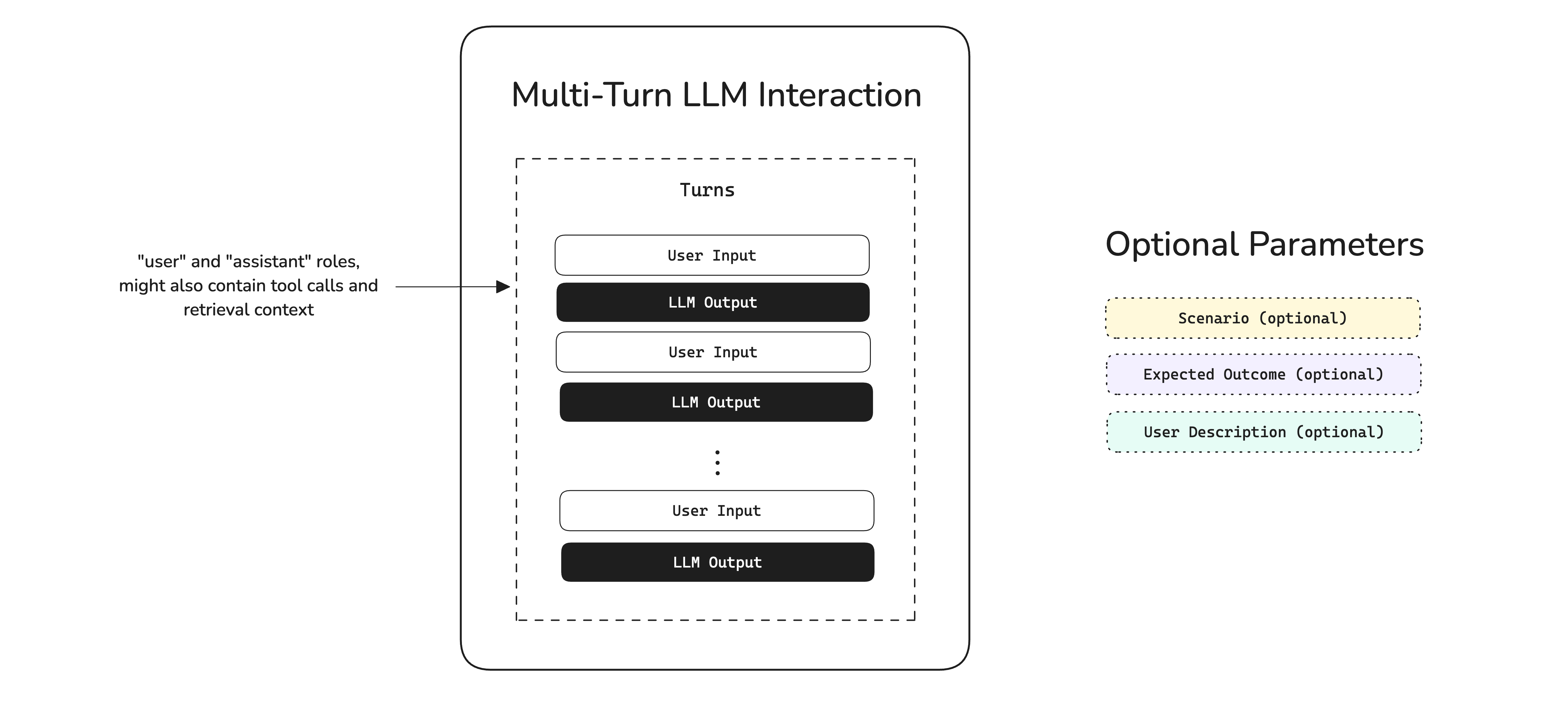
The turns parameter in a conversational test case is vital to specifying the roles and content of a conversation (in OpenAI API format), and allows you to supply any optional tools_called and retrieval_context. Additional optional parameters such as scenario and expected outcome is best suited for users converting ConversationalGoldens to test cases at evaluation time.
Conversational Test Case
While a single-turn test case represents an individual LLM system interaction, a ConversationalTestCase encapsulates a series of Turns that make up an LLM-based conversation. This is particular useful if you're looking to for example evaluate a conversation between a user and an LLM-based chatbot.
When evaluating a ConversationalTestCase with metrics, use conversational metrics.
from deepeval.test_case import Turn, ConversationalTestCase

turns = [
    Turn(role="user", content="Why did the chicken cross the road?"),
    Turn(role="assistant", content="Are you trying to be funny?"),
]

test_case = ConversationalTestCase(turns=turns)Turns
The turns parameter is a list of Turns and is basically a list of messages/exchanges in a user-LLM conversation. If you're using ConversationalGEval, you might also want to supply different parameters to a Turn. A Turn is made up of the following parameters:
class Turn:
    role: Literal["user", "assistant"]
    content: str
    user_id: Optional[str] = None
    retrieval_context: Optional[List[Union[str, RetrievedContextData]]] = None
tools_called: Optional[List[ToolCall]] = Noneclass RetrievedContextData(BaseModel):
context: str
source: strThe role parameter specifies whether a particular turn is by the "user" (end user) or "assistant" (LLM). This is similar to OpenAI's API.
For voice conversations, a Turn carries additional fields that record what was actually spoken, when, and whether the reply was cut short:
class Turn:
    ...
    audio: Optional[Audio] = None
    latency_ms: Optional[float] = None
interrupted: Optional[bool] = Noneaudio— the spoken audio for that turn as anAudioobject (clip length isAudio.duration).latency_ms— how long the assistant took to start speaking after the user finished (assistant turns).interrupted—Trueif a user barge-in cut this assistant reply short;Noneotherwise.
A ConversationalTestCase whose turns carry audio has its voice flag set to True automatically. See Voice for what these fields mean in a simulation.
Scenario
The scenario parameter is an optional parameter that specifies the circumstances of which a conversation is taking place in.
from deepeval.test_case import Turn, ConversationalTestCase

test_case = ConversationalTestCase(scenario="Frustrated user asking for a refund.", turns=[Turn(...)])
Expected Outcome
The expected_outcome parameter is an optional parameter that specifies the expected outcome of a given scenario.
from deepeval.test_case import Turn, ConversationalTestCase

test_case = ConversationalTestCase(
    scenario="Frustrated user asking for a refund.",
    expected_outcome="AI routes to a real human agent.",
    turns=[Turn(...)]
)
Expectations
Set expectations to an Expectations object to define requirements for the whole conversation, including its actions and final state. expected_outcome describes the desired end state; expectations can also specify the steps required to reach it. Either field can be supplied independently.
from deepeval import evaluate
from deepeval.dataset import Expectations
from deepeval.test_case import ConversationalTestCase, ToolCall, Turn

test_case = ConversationalTestCase(
    expected_outcome="The subscription is cancelled with the user's consent.",
    turns=[
        Turn(role="user", content="Cancel my subscription."),
        Turn(role="assistant", content="Please confirm you want to cancel."),
        Turn(role="user", content="Yes, cancel it."),
        Turn(
            role="assistant",
            content="Your subscription has been cancelled.",
            tools_called=[ToolCall(name="cancel_subscription", output={"cancelled": True})],
        ),
    ],
    expectations=Expectations(
        must=["Obtain the user's confirmation before calling cancel_subscription."],
        must_not=["Claim that a refund was issued."],
    ),
)

evaluate(test_cases=[test_case])
No metric is required. If no metrics or classifiers are supplied, every test case passed to evaluate() must have at least one must or must_not condition. The same requirement applies to the case passed to assert_test(). Missing or empty expectations raise a ValueError before evaluation begins. evaluate() and assert_test() check all must and must_not conditions across the conversation. Make timing explicit: "before cancelling", "after confirmation", or "by the end of the conversation". Include tool calls on the relevant Turn when judging actions; missing evidence produces an evaluation error.
There are FOUR optional parameters when creating an Expectations object:
- [Optional]
must: a list of non-empty strings describing conditions that must be satisfied. Defaulted to[]. - [Optional]
must_not: a list of non-empty strings describing behaviors that must be absent. Write the prohibited behavior itself, such as "Claim a refund was issued". Defaulted to[]. - [Optional]
model: a model name string or a custom LLM model of typeDeepEvalBaseLLMused to evaluate conditions inllmmode. Defaulted toNone, which uses the configured default evaluation model. Model names are preserved when saving a dataset; custom model instances serialize asnulland must be reattached after loading. - [Optional]
eval_mode:"llm"or"system_one", choosing how to judge the conditions. Defaulted toNone, which uses the configured global eval mode orllmif none is set. An explicit globalDEEPEVAL_EVAL_MODEsetting overrides the object'seval_mode. Expectations do not accepteval_mode="hybrid"; a globalhybridsetting resolves tollm, matching classifiers. Insystem_onemode, the configured default System One judge answers the conditions without calling the LLM. It requires the same System One setup as metrics and does not fall back to the LLM on errors.
At least one condition in must or must_not is required to evaluate expectations.
Chatbot Role
The chatbot_role parameter is an optional parameter that specifies what role the chatbot is supposed to play. This is currently only required for the RoleAdherenceMetric, where it is particularly useful for a role-playing evaluation use case.
from deepeval.test_case import Turn, ConversationalTestCase

test_case = ConversationalTestCase(chatbot_role="A happy jolly wizard.", turns=[Turn(...)])
Context
The context is an optional parameter that represents additional data received by your LLM application as supplementary sources of golden truth. You can view it as the ideal segment of your knowledge base relevant as support information to a specific input. Context is static and should not be generated dynamically.
from deepeval.test_case import Turn, ConversationalTestCase

test_case = ConversationalTestCase(
    context=["Customers must be over 50 to be eligible for a refund."],
    turns=[Turn(...)]
)Expected Labels
The expected_labels parameter is an optional Dict[str, str] that maps a classifier's name to the label this conversation should receive. A classifier only passes or fails a test case when its name appears here; otherwise its classification is recorded but does not affect the test case's status. Metrics never read this parameter.
from deepeval.test_case import Turn, ConversationalTestCase

test_case = ConversationalTestCase(
    scenario="User asks to cancel a subscription.",
    turns=[Turn(...)],
    expected_labels={"resolution": "resolved"},
)
Each value must be one of the labels declared on the classifier with that name, otherwise evaluate() raises a ValueError before any judge call. A key that matches no classifier in the run is ignored with a warning.
Including Images
By default deepeval supports passing both text and images inside your test cases using the MLLMImage object. The MLLMImage class in deepeval is used to reference multimodal images in your test cases. It allows you to create test cases using local images, remote URLs and base64 data.
from deepeval.test_case import ConversationalTestCase, MLLMImage, Turn

shoes = MLLMImage(url='./shoes.png', local=True)

test_case = ConversationalTestCase(
    turns=[
        Turn(role="user", content=f"What's the color of the shoes in this image? {shoes}"),
        Turn(role="assistant", content=f"They are blue shoes!")
    ],
    scenario=f"A person trying to buy shoes online by looking at a customer's photo {shoes}",
    expected_outcome=f"The assistant must clarify that the shoes in the image {shoes} are blue color.",
    context=[f"..."]
)MLLMImage Data Model
Here's the data model of the MLLMImage in deepeval:
class MLLMImage:
    dataBase64: Optional[str] = None
    mimeType: Optional[str] = None
    url: Optional[str] = None
    local: Optional[bool] = None
    filename: Optional[str] = None
You MUST either provide url or dataBase64 and mimeType parameters when initializing an MLLMImage. The local attribute should be set to True for locally stored images and False for images hosted online (default is False).
Mark Test Cases As Flaky
The flaky is an optional parameter of type boolean (defaulted to False) that marks a ConversationalTestCase as flaky. A flaky test case's results are still computed, recorded, and reported as normal, but its failures won't block your CI/CD pipeline — when a flaky test case fails, assert_test() prints a warning instead of raising an AssertionError.
from deepeval.test_case import Turn, ConversationalTestCase

test_case = ConversationalTestCase(
    flaky=True,
    turns=[Turn(...)]
)
This is most useful for conversations you know are noisy — for example simulated conversations with borderline scores that flip between passing and failing across runs — that you still want to keep evaluating and tracking without letting them gate deployments. The flaky status is also logged on Confident AI so you can monitor how often flaky test cases actually fail.
Label Test Cases For Confident AI
If you're using Confident AI, these are some additional parameters to help manage your test cases.
Name
The optional name parameter allows you to provide a string identifier to label LLMTestCases and ConversationalTestCases for you to easily search and filter for on Confident AI. This is particularly useful if you're importing test cases from an external datasource.
from deepeval.test_case import ConversationalTestCase

test_case = ConversationalTestCase(name="my-external-unique-id", ...)
Tags
Alternatively, you can also tag test cases for filtering and searching on Confident AI:
from deepeval.test_case import ConversationalTestCase

test_case = ConversationalTestCase(tags=["Topic 1", "Topic 3"], ...)
Using Test Cases For Evals
You can create test cases for two types of evaluation:
- End-to-end - Treats your multi-turn LLM app as a black-box, and evaluates the overall conversation by considering each turn's inputs and outputs.
- One-Off Standalone - Executes individual metrics on single test cases for debugging or custom evaluation pipelines
Unlike for single-turn test cases, the concept of component-level evaluation does not exist for multi-turn use cases.
FAQs
What's the difference between a ConversationalTestCase and an LLMTestCase?
ConversationalTestCase represents an entire multi-turn conversation through a list of Turns, while an LLMTestCase represents a single atomic interaction. Use the conversational one for chatbots and assistants where context spans multiple turns.What does a Turn contain?
Turn has a role (user or assistant) and content, and can optionally carry retrieval context, tools called, and MCP primitives so per-turn behavior can be evaluated.What are scenario and expected_outcome for?
scenario sets up the situation the user is in, and expected_outcome describes what a successful conversation should achieve. They're especially useful for simulating turns and for outcome-based conversational metrics.Do I have to write every turn by hand?
ConversationalGolden's scenario and user persona.Can multi-turn test cases include images?
MLLMImage objects inside a turn's content to evaluate multimodal conversations.How can my team share multi-turn conversations and visualize them in a UI?
deepeval team) renders the same conversations and their per-turn scores into a shared cloud UI, so a team can review, annotate, and track them over time — with no change to your test case code. It's entirely optional.