Multi-Turn Evaluation
Multi-turn evaluation is the process of measuring how well an LLM system maintains context, generates relevant responses, and satisfies user intentions across multiple turns of dialogue. But first, what exactly makes multi-turn evaluation different?
A multi-turn LLM application—such as a chatbot, customer support agent, or conversational assistant—is designed for back-and-forth exchanges where the user and AI build on previous messages. Unlike single-turn LLM applications that process one input and produce one output, multi-turn systems must track conversation history, remember what was said earlier, and adapt responses based on evolving context.
Since a successful outcome depends on sustained quality across an entire conversation—not just any single response—multi-turn evaluation focuses on evaluating the conversation holistically while also assessing individual turn quality.
For a deeper dive into multi-turn metrics, see the Multi-Turn Evaluation Metrics guide. For automating conversation generation, see the Multi-Turn Simulation guide.
Multi-Turn vs Single-Turn Evaluation
Before diving into the multi-turn evaluation workflow, it's important to understand why it requires a fundamentally different approach from single-turn evaluation.
Single-Turn Evaluation
In single-turn evaluation, you have a straightforward mapping: one input produces one output. You evaluate whether that output is correct, relevant, or faithful to context. The test case is self-contained.
With single-turn evaluation, you can create a dataset of input-output pairs and run metrics against each one independently. There's no dependency between test cases—each one lives in isolation.
Multi-Turn Evaluation
Multi-turn evaluation is fundamentally different because each response depends on the entire conversation history that preceded it. A response that seems irrelevant in isolation might be perfectly appropriate given what was discussed three turns ago.
This creates two key challenges:
-
You can't pre-define expected outputs. Since each user message depends on the previous assistant response, you can't know ahead of time what the conversation will look like. This is why
deepevaluses scenarios instead of fixed input-output pairs—see the Multi-Turn Simulation guide for how this works in practice. -
Quality must be sustained. An LLM that gives five perfect responses and then one terrible one has still failed. Multi-turn metrics need to evaluate consistency across the entire conversation, not just individual turns.
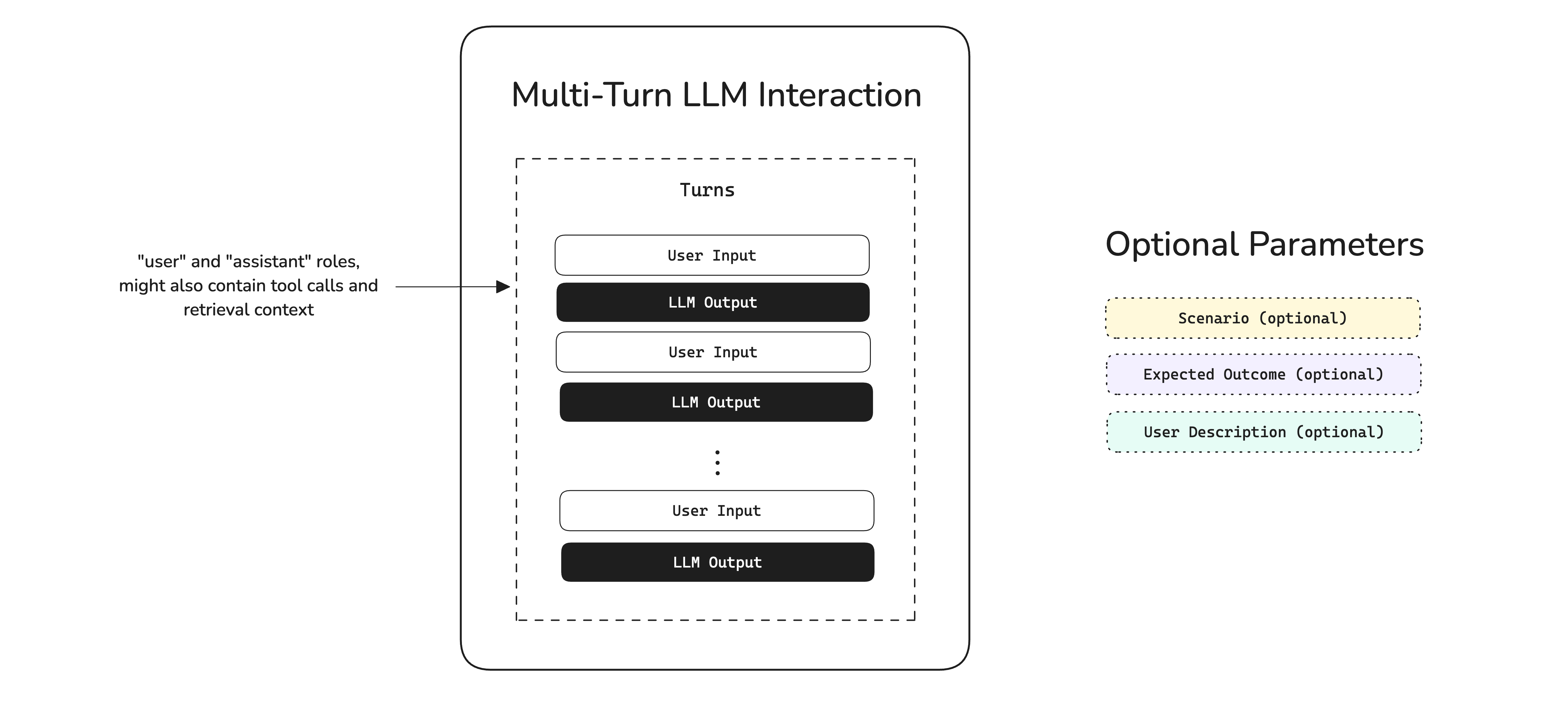
In deepeval, multi-turn interactions are grouped by scenarios defined as ConversationalGoldens. If two conversations occur under the same scenario (e.g., "Angry user asking for a refund"), we consider those comparable—even if the exact messages differ.
Common Pitfalls in Multi-Turn AI
Multi-turn conversations can fail in ways that single-turn systems simply cannot. Understanding these failure modes is the first step to building a robust evaluation pipeline.
Context & Memory Failures
The most common category of multi-turn failures relates to maintaining context across turns:
- Forgetting previous information — The user mentions their name in turn 1, and the assistant asks for it again in turn 5. This erodes trust and creates frustration.
- Contradicting earlier statements — The assistant recommends Product A in turn 2, then says Product A is out of stock in turn 6, without acknowledging the contradiction.
- Losing track of the conversation thread — In complex multi-topic conversations, the assistant may lose track of which topic is currently being discussed.
Response Quality Failures
Even with perfect memory, individual responses can fail:
- Irrelevant responses — The assistant generates a response that doesn't address what the user just said, often due to poor context window management.
- Role violations — A customer support assistant suddenly starts giving medical advice, or a professional assistant uses overly casual language.
- Incomplete resolution — The assistant addresses part of the user's request but ignores other aspects, leaving the user unsatisfied.
Conversation Flow Failures
Beyond individual turns, the overall conversation arc can break down:
- Failing to reach resolution — The conversation goes in circles without ever solving the user's problem, often from an assistant that keeps asking clarifying questions without acting on the answers.
- Premature closure — The assistant ends the conversation or changes topics before the user's needs are fully met.
- Topic drift — The conversation gradually drifts away from the user's original intent without the assistant steering it back.
Workflows for Multi-turn Evals
Multi-turn evaluation spans two environments that feed into each other:
- Development — Define conversational scenarios, simulate user interactions, and benchmark with multi-turn metrics.
- Production — Log real conversations as threads on Confident AI and evaluate them asynchronously.
Failing production conversations get fed back into your development dataset, creating a continuous improvement loop.
Multi-Turn Evals In Development
Development evaluation is about benchmarking—comparing different versions of your multi-turn LLM application on the same set of scenarios to measure improvement.
The simulation works in three steps:
- A
ConversationalGoldenfeeds the scenario and persona into theConversationSimulator. - The simulator generates user messages, your LLM responds, and this loops until the expected outcome is reached or max turns is hit.
- The full conversation is packaged into a
ConversationalTestCasefor evaluation.
Define Scenarios
Instead of pre-defined input-output pairs, multi-turn evaluation starts with scenarios—descriptions of the conversational situations you want to test. In deepeval, these are represented as ConversationalGoldens:
from deepeval.dataset import EvaluationDataset, ConversationalGolden, Persona

dataset = EvaluationDataset(goldens=[
    ConversationalGolden(
        scenario="Frustrated customer requesting a refund for a defective product",
        expected_outcome="Customer receives refund confirmation and apology",
        persona=Persona(characteristics="Impatient customer who has already contacted support twice"),
    ),
    ConversationalGolden(
        scenario="New user asking for help setting up their account",
        expected_outcome="User successfully creates account and understands key features",
        persona=Persona(characteristics="Non-technical user, first time using the product"),
    ),
    ConversationalGolden(
        scenario="User asking complex technical questions about API integration",
        expected_outcome="User gets accurate technical guidance with code examples",
        persona=Persona(characteristics="Senior software engineer integrating the product's REST API"),
    ),
])
Each golden defines what the conversation is about and what success looks like, without dictating the exact messages. This is the key insight that makes multi-turn benchmarking possible.
Simulate Conversations
Manually chatting with your LLM for every test case is time-consuming and non-reproducible. deepeval's ConversationSimulator automates this by playing the role of the user, driving conversations based on your scenarios. For a deep dive into simulation concepts, callback patterns, and advanced usage, see the Multi-Turn Simulation guide.
Here's how to set it up:
from deepeval.test_case import Turn
from deepeval.conversation_simulator import ConversationSimulator

# Wrap your LLM application in a callback
async def model_callback(input: str, turns: list, thread_id: str) -> Turn:
    response = await your_llm_app(input, turns, thread_id)
    return Turn(role="assistant", content=response)

# Create simulator and run
simulator = ConversationSimulator(model_callback=model_callback)
test_cases = simulator.simulate(goldens=dataset.goldens, max_turns=10)
The simulator role-plays as the user from each ConversationalGolden, looping until the expected outcome is reached or max turns is hit. The result is a set of ConversationalTestCases ready for evaluation—each containing the full turn history plus the original scenario and expected outcome.
Returning Rich Turns
The model_callback returns a Turn object, which can carry more than just content. If your application uses RAG or calls tools, include retrieval_context and tools_called on the returned turn—several metrics depend on these fields:
from deepeval.test_case import Turn, ToolCall

async def model_callback(input: str, turns: list, thread_id: str) -> Turn:
    result = await your_llm_app(input, turns, thread_id)
    return Turn(
        role="assistant",
        content=result["response"],
        retrieval_context=result.get("retrieved_docs"),
        tools_called=[
            ToolCall(name=tc["name"], description=tc["description"])
            for tc in result.get("tool_calls", [])
        ] or None,
    )
Turn field | Required by |
|---|---|
content | All metrics |
retrieval_context | TurnFaithfulnessMetric, TurnContextualRelevancyMetric, TurnContextualPrecisionMetric, TurnContextualRecallMetric |
tools_called | ToolUseMetric, GoalAccuracyMetric |
Choose and Run Metrics
deepeval provides a wide range of multi-turn metrics that target different aspects of conversational quality. Here are some of the most commonly used ones:
| Metric | What It Measures | When to Use |
|---|---|---|
ConversationCompletenessMetric | Whether user intentions are satisfied throughout the conversation | Always—this is the most fundamental multi-turn metric |
TurnRelevancyMetric | Whether each assistant response is relevant to what the user said | Always—catches off-topic or non-sequitur responses |
KnowledgeRetentionMetric | Whether the assistant remembers facts shared earlier in the conversation | When your application handles information-heavy conversations |
RoleAdherenceMetric | Whether the assistant stays in character and follows its assigned role | When your application has a specific persona or behavioral guidelines |
ConversationalGEval | Any custom criteria you define in plain English | When built-in metrics don't cover your specific quality requirements |
With simulated conversations in hand, run your chosen metrics:
from deepeval import evaluate
from deepeval.metrics import (
    ConversationCompletenessMetric,
    TurnRelevancyMetric,
    KnowledgeRetentionMetric,
    RoleAdherenceMetric,
)

evaluate(
    test_cases=test_cases,
    metrics=[
        ConversationCompletenessMetric(),
        TurnRelevancyMetric(),
        KnowledgeRetentionMetric(),
        RoleAdherenceMetric(),
    ]
)
This creates a test run—a snapshot of your LLM application's conversational performance at a point in time. Each test case is evaluated against all specified metrics, producing scores, reasons, and pass/fail results.
After each test run, analyze which scenarios consistently fail and which metrics score lowest. Use these insights to improve your system prompt, context management, or retrieval pipeline, then re-run the evaluation to measure impact.
Using Custom Criteria
The built-in metrics cover common quality dimensions, but your application likely has specific requirements. Use ConversationalGEval to define custom evaluation criteria in plain English:
from deepeval.metrics import ConversationalGEval

empathy = ConversationalGEval(
    name="Empathy",
    criteria="Evaluate whether the assistant demonstrates empathy and emotional awareness when the user expresses frustration, confusion, or dissatisfaction."
)

policy_compliance = ConversationalGEval(
    name="Policy Compliance",
    criteria="Evaluate whether the assistant follows company policies, such as not offering unauthorized discounts, not making promises outside its authority, and always directing sensitive issues to human agents."
)

evaluate(test_cases=test_cases, metrics=[empathy, policy_compliance])Multi-Turn Evals In Production
In production, the goal shifts from benchmarking to continuous monitoring. Real user conversations are unpredictable—they'll surface edge cases your development scenarios never anticipated.
Production evaluation needs to:
- Run asynchronously — never add latency to your application's responses
- Scale automatically — handle thousands of concurrent conversations
- Surface actionable insights — identify quality degradation before users churn
While you could build this infrastructure yourself, Confident AI handles it seamlessly.
Setting Up Production Monitoring
Create a metric collection
Log in to Confident AI and create a metric collection containing the conversational metrics you want to run in production:
Log conversations as threads
Confident AI groups multi-turn conversations into threads—the production equivalent of ConversationalTestCases. Each thread captures the full conversation history and can be evaluated against your metric collection.
Feed production data back to development
The most powerful aspect of production monitoring is the feedback loop. When you discover failing conversations in production, you can convert them into ConversationalGoldens and add them to your development dataset. This ensures your benchmark evolves with real-world usage patterns.
Conclusion
In this guide, you learned that multi-turn evaluation requires a fundamentally different approach from single-turn LLM evaluation:
- Multi-turn conversations are non-deterministic — you can't pre-define expected outputs, so you use scenarios instead
- Quality must be sustained — a single bad turn can ruin an otherwise good conversation
- Simulation enables standardized benchmarking — the
ConversationSimulatorautomates user interactions for reproducible testing
To catch multi-turn failures, deepeval provides a rich set of conversational metrics you can apply at the conversation level—from ConversationCompletenessMetric and TurnRelevancyMetric to KnowledgeRetentionMetric, RoleAdherenceMetric, and many more. You can also define custom criteria with ConversationalGEval.
With proper evaluation in place, you can catch quality regressions before users notice, ensure your application handles diverse conversational scenarios gracefully, make data-driven decisions about prompt and model changes, and continuously improve through production feedback loops.
FAQs
What is multi-turn evaluation?
How is multi-turn evaluation different from single-turn evaluation?
What is a ConversationalTestCase in DeepEval?
ConversationalTestCase wraps a list of Turns (alternating user and assistant messages) and is the unit that multi-turn metrics like ConversationCompletenessMetric and TurnRelevancyMetric evaluate against.Why do I need to simulate conversations?
Which multi-turn metrics should I start with?
ConversationCompletenessMetric, TurnRelevancyMetric, and KnowledgeRetentionMetric for general chatbots. Add RoleAdherenceMetric and TopicAdherenceMetric for persona-bound assistants, and the multi-turn RAG metrics if your system retrieves context.Can I run multi-turn evaluation in CI/CD?
How do I monitor multi-turn quality in production?
thread_id so each conversation becomes a thread on Confident AI, then attach a multi-turn metric_collection. Confident AI evaluates threads asynchronously and lets you replay sessions turn-by-turn to debug drift.Next Steps And Additional Resources
While deepeval handles the metrics and simulation logic, Confident AI is the platform that brings everything together for production multi-turn evaluation:
- Thread Monitoring — Visualize full conversations, replay user interactions, and identify failure patterns
- Async Production Evals — Run multi-turn evaluations without blocking your application or consuming production resources
- Dataset Management — Curate and version conversational golden datasets on the cloud, and feed production failures back into your test bench
- Performance Tracking — Monitor conversation quality trends over time and catch degradation early
- Shareable Reports — Generate testing reports with conversation-level detail you can share with your team
Ready to get started? Here's what to do next:
- Explore the metrics — Learn how each multi-turn metric works in the Multi-Turn Evaluation Metrics guide
- Set up simulation — Follow the Multi-Turn Simulation guide to automate your test bench
- Login to Confident AI — Run
deepeval loginin your terminal to connect your account - Read the quickstart — For a hands-on walkthrough, check out the Chatbot Evaluation Quickstart
- Reference docs — ConversationalTestCase · ConversationSimulator · EvaluationDataset
- Join the community — Have questions? Join the DeepEval Discord—we're happy to help!
Congratulations 🎉! You now have the knowledge to build robust multi-turn evaluation pipelines for your LLM applications.