Building a DAG Metric
A single LLM judge is convenient, but it can be unpredictable when your rubric contains several conditional rules. A DAG metric makes those rules explicit: each node performs one small task or decision, and each path ends at a score you chose. You build the graph top-down, so its code follows the same order as its evaluation flow.
This guide walks through building both kinds of DAG metrics:
- A single-turn
DAGMetricthat scores oneLLMTestCase, such as a meeting summary. - A multi-turn
ConversationalDAGMetricthat scores an entireConversationalTestCase, such as a chatbot conversation.
By the end, you will know how to define nodes, connect them top-down, share a node across multiple paths, and run the completed graph against a test case.
When to Use a DAG
Use a DAG when your scoring rubric contains explicit branches such as:
- "If a required fact is missing, score 0; otherwise evaluate its quality."
- "If the response violates policy, fail immediately."
- "Classify the response into one of several known quality levels."
Use GEval when you want one holistic judgement and do not need exact control over how each condition affects the final score. You can also place a GEval or another BaseMetric at the end of a DAG branch when only part of the rubric is subjective.
Whether you build a single-turn or multi-turn DAG depends only on what you are evaluating: use a single-turn DAGMetric for individual input–output pairs, and a multi-turn ConversationalDAGMetric for whole conversations. The node types differ, but the way you design and wire the graph is identical.
Understanding Each Node
Think of a DAG as three layers: processing nodes prepare evidence, judgement nodes choose a branch, and each branch's outcome either finishes the evaluation or sends it to another node.
Every node type below has a multi-turn counterpart prefixed with Conversational (for example, ConversationalTaskNode), which reads MultiTurnParams from a conversation instead of SingleTurnParams from a single test case.
TaskNode: prepare evidence
A TaskNode asks the evaluation model to transform test-case data into a smaller, easier-to-judge representation. Use it to extract headings, claims, dates, tool names, or any other structure that later decisions depend on.
It does not assign a score. Connect it to downstream task or judgement nodes with add_node(child). Its output_label names the generated result so child nodes can understand what they receive.
BinaryJudgementNode: make a yes/no decision
A BinaryJudgementNode evaluates one narrow criterion and returns True or False. It must define exactly one outcome for each value:
check = BinaryJudgementNode(criteria="Does the answer cite a source?")
check.add_verdict(verdict=False, score=0)
check.add_verdict(verdict=True, score=10)
Use binary nodes for gates and requirements where there are exactly two possible outcomes.
NonBinaryJudgementNode: choose a named outcome
A NonBinaryJudgementNode classifies evidence into one of several string outcomes. Each verdict string must be unique and should describe an unambiguous category:
quality = NonBinaryJudgementNode(criteria="Classify the response quality.")
quality.add_verdict(verdict="Excellent", score=10)
quality.add_verdict(verdict="Acceptable", score=6)
quality.add_verdict(verdict="Poor", score=2)
Use it when a binary pass/fail decision would discard useful distinctions.
Ending a path: score or continue
Every outcome you register with add_verdict(...) has exactly one destination:
score=<0-10>ends the path and converts that value to the metric's 0–1 score.then=<node or metric>continues the path through another node, aGEval, or anotherBaseMetric.
This is how a DAG ends: every path eventually reaches a verdict that assigns a score or hands evaluation to a metric. It is also what turns a decision tree into a reusable graph, since several verdicts can continue into the same downstream node.
DeepAcyclicGraph: validate the completed graph
After wiring the nodes, pass the root nodes to DeepAcyclicGraph. Construction validates node shapes, rejects cycles, and records dependencies for shared nodes. Create the graph only after every judgement node has all of its verdicts. Both single-turn and multi-turn DAGs use the same DeepAcyclicGraph class.
Single-Turn Walkthrough
We will write a custom DAGMetric to determine whether an LLM application summarized a meeting transcript in the correct format. Our rules are:
- The summary of meeting transcripts should contain the "intro", "body", and "conclusion" headings.
- The summary of meeting transcripts should present the "intro", "body", and "conclusion" headings in the correct order.
Here's the example LLMTestCase representing the transcript to be evaluated for formatting correctness:
from deepeval.test_case import LLMTestCase

test_case = LLMTestCase(
    input="""
Alice: "Today's agenda: product update, blockers, and marketing timeline. Bob, updates?"
Bob: "Core features are done, but we're optimizing performance for large datasets. Fixes by Friday, testing next week."
Alice: "Charlie, does this timeline work for marketing?"
Charlie: "We need finalized messaging by Monday."
Alice: "Bob, can we provide a stable version by then?"
Bob: "Yes, we'll share an early build."
Charlie: "Great, we'll start preparing assets."
Alice: "Plan: fixes by Friday, marketing prep Monday, sync next Wednesday. Thanks, everyone!"
""",
    actual_output="""
Intro:
Alice outlined the agenda: product updates, blockers, and marketing alignment.

Body:
Bob reported performance issues being optimized, with fixes expected by Friday. Charlie requested finalized messaging by Monday for marketing preparation. Bob confirmed an early stable build would be ready.

Conclusion:
The team aligned on next steps: engineering finalizing fixes, marketing preparing content, and a follow-up sync scheduled for Wednesday.
"""
)
Build Your Decision Tree
Start by sketching a directed, acyclic decision graph for your rubric:
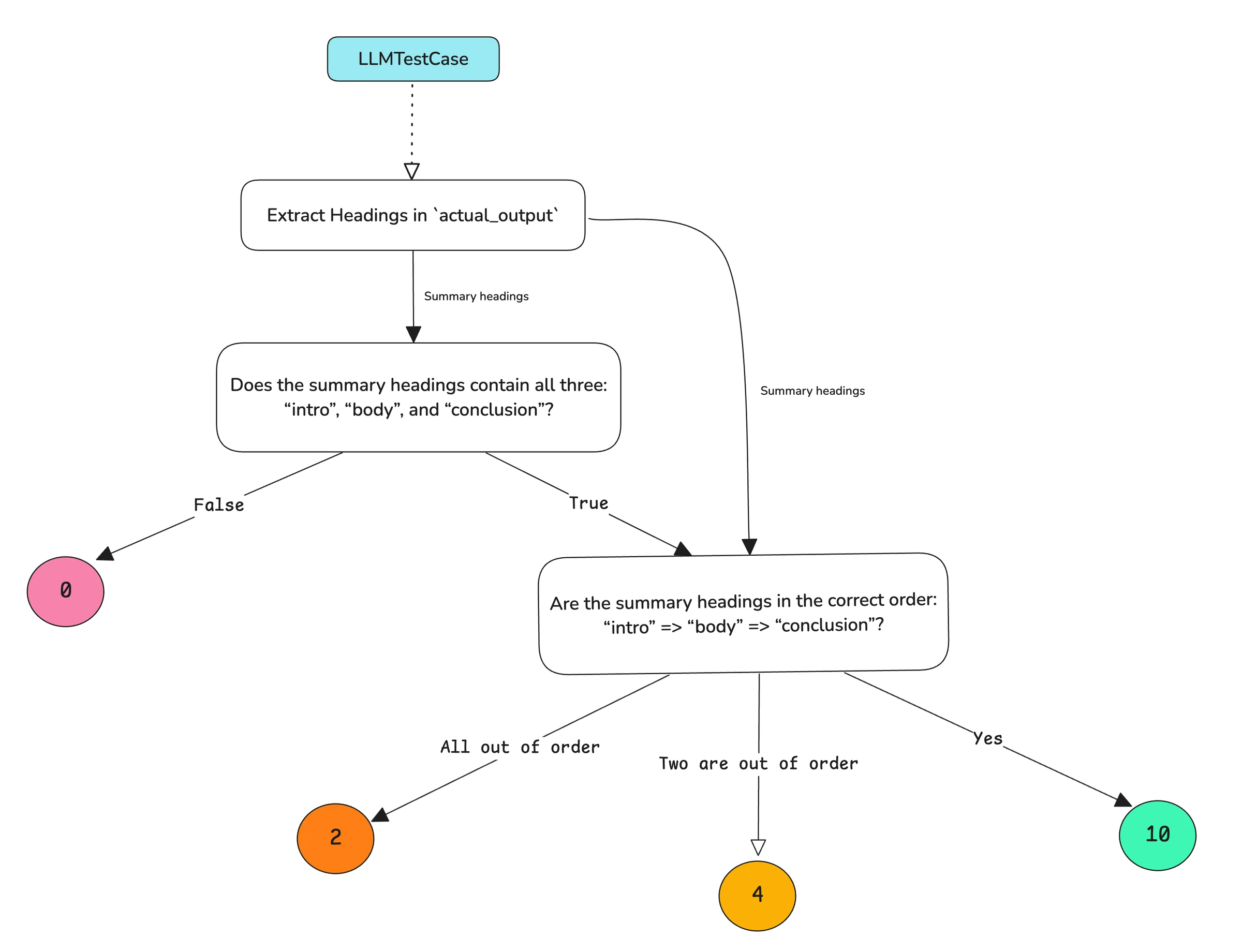
The actual_output is first processed to extract its headings. The graph then checks whether every required heading is present. A missing heading ends the path with a score of 0; otherwise, evaluation continues to classify how accurately the headings are ordered.
Here, the TaskNode extracts summary headings, the BinaryJudgementNode determines whether all headings are present, and the NonBinaryJudgementNode classifies their order. The selected verdict determines the final score.
Implement DAG In Code
You build a DAG top-down: first define your nodes, then wire the edges with add_node and add_verdict. This reads in the same order as the decision tree above — extract the headings, check they're all present, then check their order:
from deepeval.test_case import SingleTurnParams
from deepeval.metrics.dag import (
    DeepAcyclicGraph,
    TaskNode,
    BinaryJudgementNode,
    NonBinaryJudgementNode,
)

# 1. Define your nodes
extract_headings_node = TaskNode(
    instructions="Extract all headings in `actual_output`",
    evaluation_params=[SingleTurnParams.ACTUAL_OUTPUT],
    output_label="Summary headings",
)
correct_headings_node = BinaryJudgementNode(
    criteria="Does the summary headings contain all three: 'intro', 'body', and 'conclusion'?",
)
correct_order_node = NonBinaryJudgementNode(
    criteria="Are the summary headings in the correct order: 'intro' => 'body' => 'conclusion'?",
)

# 2. Wire the graph top-down
extract_headings_node.add_node(correct_headings_node)
extract_headings_node.add_node(correct_order_node)

correct_headings_node.add_verdict(verdict=False, score=0)
correct_headings_node.add_verdict(verdict=True, then=correct_order_node)

correct_order_node.add_verdict(verdict="Yes", score=10)
correct_order_node.add_verdict(verdict="Two are out of order", score=4)
correct_order_node.add_verdict(verdict="All out of order", score=2)

# 3. Create the DAG
dag = DeepAcyclicGraph(root_nodes=[extract_headings_node])
Each node type exposes exactly one wiring method:
TaskNode.add_node(child)— attaches a downstream node (anotherTaskNode,BinaryJudgementNode, orNonBinaryJudgementNode). Returns the child. OnlyTaskNodes haveadd_node, since only they fan out to plain downstream nodes.BinaryJudgementNode.add_verdict(...)/NonBinaryJudgementNode.add_verdict(verdict, *, score=None, then=None)— attaches one outcome to a judgement node. Provide either ascore(0–10, ending the path) orthen(continue evaluation with another node, or aGEval/BaseMetricto run).
When creating your DAG, there are three important points to remember:
- There should only be an edge to a parent node if the current node depends on the output of the parent node.
- All task and judgement nodes can have access to an
LLMTestCaseat any point in time. - Not every verdict ends the graph — a verdict created with
thencontinues to another node instead of scoring, but every path eventually terminates at a verdict that assigns ascoreor passes onto a metric.
IMPORTANT: You'll see that in our example, extract_headings_node also points to correct_order_node because correct_order_node's criteria depends on the extracted summary headings — and correct_order_node is reused by both extract_headings_node and the True verdict of correct_headings_node (a shared node, reached only after both parents run).
Create Your DAGMetric
Now that you have your DAG, all that's left to do is to simply supply it when creating a DAGMetric:
from deepeval.metrics import DAGMetric

...
format_correctness = DAGMetric(name="Format Correctness", dag=dag)
format_correctness.measure(test_case)
print(format_correctness.score)
The metric returns a normalized score between 0 and 1. See the DAG metric reference for configuration options such as threshold, model, include_reason, strict_mode, and async_mode.
Another Single-Turn Example: Gate Customer Support Responses
Not every DAG needs a preprocessing step. This smaller example immediately checks for a policy violation, then grades the response quality only when it is safe to continue:
from deepeval.metrics import DAGMetric
from deepeval.metrics.dag import (
    BinaryJudgementNode,
    NonBinaryJudgementNode,
    DeepAcyclicGraph,
)
from deepeval.test_case import SingleTurnParams

policy_check = BinaryJudgementNode(
    criteria="Does the response promise a refund outside the stated policy?",
    evaluation_params=[SingleTurnParams.ACTUAL_OUTPUT],
)
response_quality = NonBinaryJudgementNode(
    criteria="Classify the support response using one of the available quality levels.",
    evaluation_params=[SingleTurnParams.ACTUAL_OUTPUT],
)

policy_check.add_verdict(verdict=True, score=0)
policy_check.add_verdict(verdict=False, then=response_quality)

response_quality.add_verdict(verdict="Helpful and clear", score=10)
response_quality.add_verdict(verdict="Helpful but unclear", score=6)
response_quality.add_verdict(verdict="Dismissive", score=2)

support_dag = DeepAcyclicGraph(root_nodes=[policy_check])
support_metric = DAGMetric(name="Support Response Quality", dag=support_dag)
This shape is useful for gating: a hard requirement can end evaluation immediately, while acceptable responses continue to a more nuanced judgement.
Multi-Turn Walkthrough
Everything so far scored a single LLMTestCase. A multi-turn DAG instead evaluates an entire conversation using the ConversationalDAGMetric and the Conversational node variants, which read MultiTurnParams from a ConversationalTestCase.
We will build a DAG that evaluates whether a playful chatbot performs its role correctly: it should satisfy the user's requests while keeping a playful tone. Here's the conversation to evaluate:
from deepeval.test_case import ConversationalTestCase, Turn

convo_test_case = ConversationalTestCase(
    turns=[
        Turn(role="user", content="what's the weather like today?"),
        Turn(role="assistant", content="Where do you live bro? T~T"),
        Turn(role="user", content="Just tell me the weather in Paris"),
        Turn(role="assistant", content="The weather in Paris today is sunny and 24°C."),
        Turn(role="user", content="Should I take an umbrella?"),
        Turn(role="assistant", content="You trying to be stylish? I don't recommend it."),
    ]
)
Just by eyeballing the conversation, we can tell that the user's request was satisfied but the assistant might've been rude. A normal ConversationalGEval might not work well here, so let's build a deterministic decision tree that'll evaluate the conversation step by step.
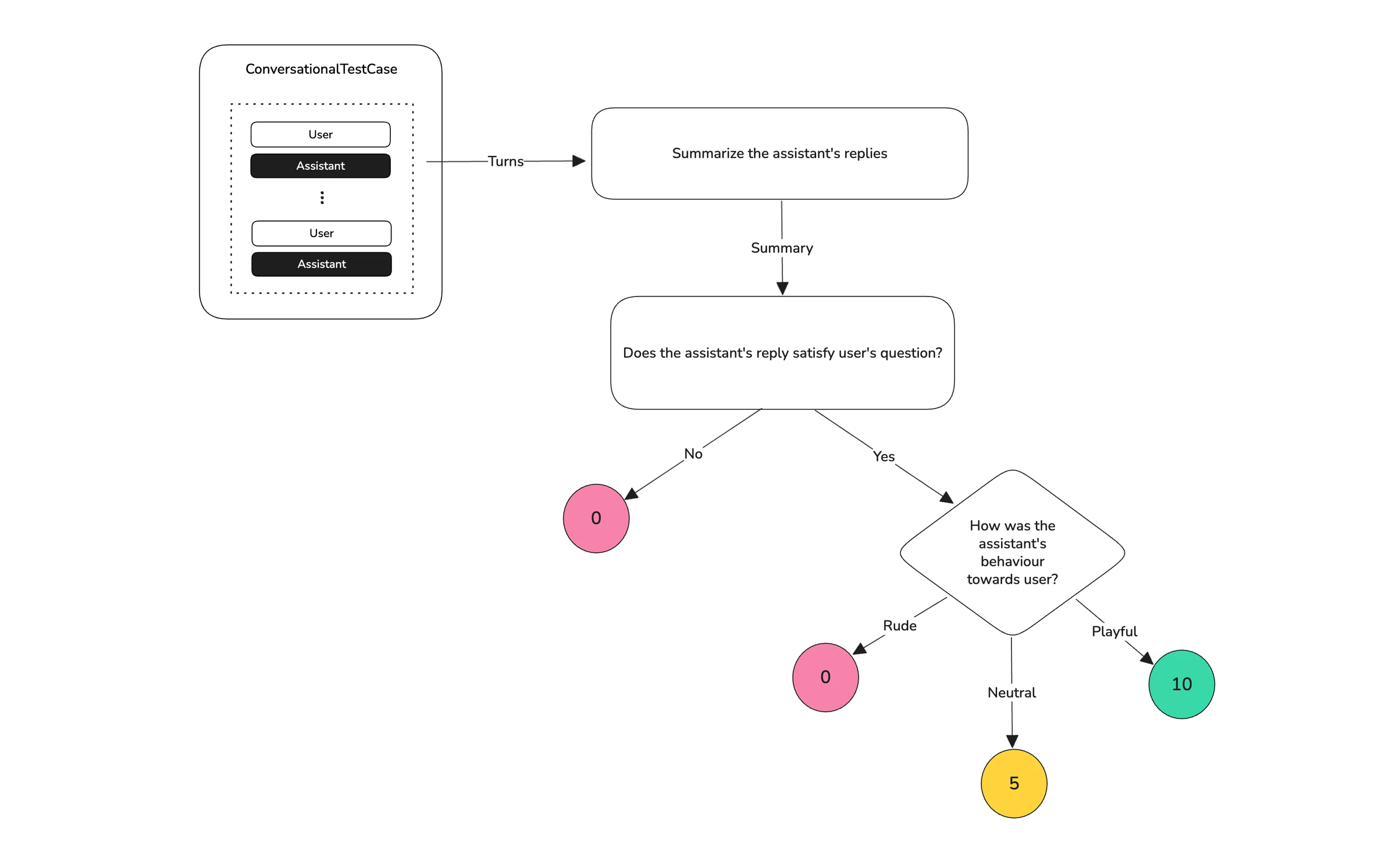
Here's the decision tree we are going to build:
Construct the graph
Summarize the conversation
When conversations get long, summarizing them can help focus the evaluation on key information. The ConversationalTaskNode allows us to perform tasks like this on our test cases.
from deepeval.metrics.conversational_dag import ConversationalTaskNode
from deepeval.test_case import MultiTurnParams

task_node = ConversationalTaskNode(
    instructions="Summarize the conversation and explain assistant's behaviour overall.",
    output_label="Summary",
    evaluation_params=[MultiTurnParams.ROLE, MultiTurnParams.CONTENT],
)
You can also pass a turn_window to focus on just some parts of the conversation as needed. We'll wire this node's children later when we connect the DAG together.
Evaluate user satisfaction
Some decisions like the user satisfaction here may be a simple close-ended question that is either yes or no. We will use the ConversationalBinaryJudgementNode to make judgements that can be classified as a binary decision.
from deepeval.metrics.conversational_dag import ConversationalBinaryJudgementNode

binary_node = ConversationalBinaryJudgementNode(
    criteria="Do the assistant's replies satisfy user's questions?",
)
binary_node.add_verdict(verdict=False, score=0)
binary_node.add_verdict(verdict=True, score=10)
Here the score for satisfaction is 10. When we connect the DAG, we'll replace that with then=non_binary_node so a satisfied user continues down a new path.
Judge assistant's behavior
Decisions like behaviour analysis can be a multi-class classification. We will use the ConversationalNonBinaryJudgementNode to classify assistant's behaviour from a given list of options from our verdicts.
from deepeval.metrics.conversational_dag import ConversationalNonBinaryJudgementNode

non_binary_node = ConversationalNonBinaryJudgementNode(
    criteria="How was the assistant's behaviour towards user?",
)
non_binary_node.add_verdict(verdict="Rude", score=0)
non_binary_node.add_verdict(verdict="Neutral", score=5)
non_binary_node.add_verdict(verdict="Playful", score=10)This is the final node in our DAG.
Connect the DAG together
We now connect the nodes top-down: define each node, then wire the edges with add_node and add_verdict. This reads in the same order as the evaluation flows — summarize, check satisfaction, then judge behaviour.
from deepeval.metrics.dag import DeepAcyclicGraph
from deepeval.metrics.conversational_dag import (
    ConversationalTaskNode,
    ConversationalBinaryJudgementNode,
    ConversationalNonBinaryJudgementNode,
)
from deepeval.test_case import MultiTurnParams

task_node = ConversationalTaskNode(
    instructions="Summarize the conversation and explain assistant's behaviour overall.",
    output_label="Summary",
    evaluation_params=[MultiTurnParams.ROLE, MultiTurnParams.CONTENT],
)
binary_node = ConversationalBinaryJudgementNode(criteria="Do the assistant's replies satisfy user's questions?")
non_binary_node = ConversationalNonBinaryJudgementNode(criteria="How was the assistant's behaviour towards user?")

task_node.add_node(binary_node)
binary_node.add_verdict(verdict=False, score=0)
binary_node.add_verdict(verdict=True, then=non_binary_node) # connect the node here
non_binary_node.add_verdict(verdict="Rude", score=0)
non_binary_node.add_verdict(verdict="Neutral", score=5)
non_binary_node.add_verdict(verdict="Playful", score=10)

dag = DeepAcyclicGraph(root_nodes=[task_node])
We can see that a satisfied user (binary_node's True verdict) continues to non_binary_node via then=, and binary_node is attached to task_node so it runs after the summary has been extracted.
✅ We have now successfully created a multi-turn DAG that evaluates the above test case example. Here's what this DAG does:
- Summarize the conversation using the
ConversationalTaskNode - Determine user satisfaction using the
ConversationalBinaryJudgementNode - Classify assistant's behaviour using the
ConversationalNonBinaryJudgementNode
Create Your ConversationalDAGMetric
We can now pass this graph to ConversationalDAGMetric and run an evaluation:
from deepeval import evaluate
from deepeval.metrics import ConversationalDAGMetric

playful_chatbot_metric = ConversationalDAGMetric(name="Playful Chatbot", dag=dag)

evaluate([convo_test_case], [playful_chatbot_metric])
What would you classify the above conversation as according to our DAG? Run your evals in this colab notebook and compare your evaluation with the ConversationalDAGMetric's result.
See the conversational DAG metric reference for configuration options and the full multi-turn node reference.